# Introduction
Welcome to Blanksquare Docs!
**Blanksquare** is the **composable privacy stack** for wallets and DeFi apps. We deliver plug-and-play privacy infrastructure (Shielder SDK, Shielded Accounts, Relayer Network, Anonymity Revoking mechanisms) that can be integrated directly into EVM-compatible wallets.
Our goal is to make on-chain privacy usable, scalable, and compliant by default. With Blanksquare, wallets and dApps can unlock private, auditable interactions for their users without the technical lift, while generating revenue through withdrawal and shielding fees.
### What you will find in these docs
This documentation is divided into three main sections:
* [**Key concepts**](/key-concepts/shielded-pools): why is there no privacy in Web3? How does Blanksquare come into play? In particular we explain shielding and related concepts. These chapters are mostly targeted at users looking to learn more about Blanksquare and privacy in general.
* [**User guides**](/user-guides/key-generation-process): a practical set of guidelines for using Blanksquare-powered products. This section's goal is to provide general best practices for anyone setting out to use either Blanksquare's own pilot apps, or any wallet or app that uses Blanksquare.
* [**Integration guides**](/integration-guides/quickstart): containing a comprehensive walkthrough of implementing Blanksquare's privacy in a third-party product, as well as demo apps and integration examples. They will be most useful to developers and anyone wishing to add privacy to their existing wallet or app.
* [**Protocol details**](/protocol-details/shielder): diving deep into the concepts behind the product, such as ZK relations, encryption schemes, approaches to anonymity revoking and more. Even though a certain level of mathematical proficiency is recommended to fully enjoy all of the sections, they will be useful not only to cryptographers, but anyone willing to dive deep into the exciting world of zero-knowledge proofs and privacy concepts.
# Fixing Privacy in web3
Why Usable Privacy is the Missing Layer in Web3
The foundational features of blockchain are its support for self-custody and permissionless access. Users can directly hold and transfer assets without relying on centralized intermediaries, and anyone can interact with the network without prior approval. These properties represent a significant shift from traditional financial systems, where access and custody are often tightly controlled by centralized parties.
\
Another feature of blockchain, a consequence of how these systems are constructed, is transparency. Unlike traditional finance, where much of the system operates behind closed doors, blockchain makes all activity visible and verifiable. This is a good property overall because it lets anyone audit the system—whether it's checking that no one is printing extra tokens or verifying that a smart contract is behaving as expected. But this transparency also comes with a critical drawback: the lack of privacy. All transaction data, including sender and recipient addresses, amounts, and smart contract interactions, is publicly visible and permanently recorded on the ledger. While pseudonymous, this data can be linked to real-world identities through heuristic analysis or data leakage elsewhere, leading to deanonymization. In practice, this level of transparency results in a privacy landscape that is significantly worse than in conventional financial systems, where at least some degree of confidentiality is preserved through institutional practices and legal protections. On public blockchains, every financial interaction is exposed by default, creating risks for individual users and businesses alike. This privacy deficit presents a major barrier to broader adoption. While scalability, throughput, and user experience are commonly discussed limitations, the inability to preserve financial privacy may prove to be the more fundamental obstacle. No amount of technical scaling will address the reluctance of users to adopt a system that exposes their financial behavior to the public. As such, a working privacy-enabling mechanism is a necessary prerequisite for mass adoption of blockchain-based financial infrastructure.
Blanksquare addresses this challenge by:
* **Equipping developers** with a robust, intuitive interface that hides the complexity of zero‑knowledge proofs and advanced cryptography, enabling the integration of privacy into wallets and rapid creation of privacy-preserving applications without specialized expertise.
* **Delivering ready‑to‑use, privacy‑enhancing solutions** powered by Shielder SDK, and showcasing its capabilities.
By eliminating the need to build cryptographic primitives from scratch, Blansquare opens the door to integrating shielded accounts directly in wallets. Moreover the incentive structure around the Blanksquare is designed so that developers of interfaces (wallets, apps) through which private traffic is routed, earn part of the revenue, making it sustainable.
# Shielding
As alluded to earlier, privacy is both necessary and missing in Web3. Like with many complex systems, there are two broad approaches to adding privacy to Web3:
1. Since the current tech stack lacks privacy, build a completely new system from scratch—using fresh technology and new cryptographic tools. The old one can be considered deprecated.
2. Enhance existing blockchains with privacy features.
From a technical or purely academic standpoint, the first approach is preferred. It's generally easier to build something new than to retrofit privacy into an existing system. There are also several well-known ways to design blockchains with much stronger native privacy than what we currently see in public chains like EVM, Solana, or Sui.
However, we firmly believe this is not the right path forward. Blanksquare is pursuing the second approach: bringing privacy to systems that lack it but already enjoy significant adoption.
Here’s why:
* Building new ecosystems is time-consuming and slow to gain adoption. Attracting users—and especially developers—to new blockchain stacks is a long process, especially given how dominant EVM is and how mature the existing DeFi ecosystem has become.
* The timeline for delivering *usable* privacy to real users varies drastically between the two approaches. With approach 2, we can ship privacy features immediately. Approach 1 is inherently slower to gain traction.
* Even if approach 1 is the better long-term path, it still makes sense to introduce privacy gradually—starting with where the users already are. This isn’t just a technical challenge; it’s also about education and helping users develop good privacy practices over time.
#### Shielded Pools
The technical core of Blanksquare's privacy stack are Shielded Pools deployed as smart contracts on public blockchains. Without going into much detail — they allow users to create "shielded" variants of their on-chain assets. When moving shielding assets, the transaction origin is not recorded on-chain, which makes tracking impossible. If you are interested in how they work, we refer to [Simplest Explanation of Shielder](/protocol-details/shielder) for a non-technical explanation of how shielding works, and to subsequent sections in [Protocol Details](/protocol-details/shielder) for technical details.
Note, importantly, that the developers integrating Blansquare via [Integration guides](/integration-guides/what-is-shielder-sdk) don't need to know how Shielded Pools exactly work, as the Shielder-SDK that is provided abstracts out the inner workings of zk-cyrptography, so that the integrators can focus on UX, and end-users, in turn, can enjoy the good experience.
#### Using Shielded Pools
The goal of Blanksquare is to let users stay private while keeping the experience of interacting with blockchains smooth. Even though, at the core layer, users hold or transact with shielded assets, we want the experience to match that of using regular assets, such as ERC20 tokens. To make this possible, we designed the Shielder-SDK to hide as much complexity as possible—both from the developer integrating Blanksquare into their solution (be it a wallet or a dApp) and, as a consequence, from the end user.
#### Composability
The main advantage of Shielded Pools is that they are perfectly compatible and composable with existing DeFi protocols. Virtually everything that happens in DeFi is about holding or transferring tokens. Even providing liquidity in AMMs (you get LP tokens in return) or lending tokens in lending protocols (you receive share tokens) can be cast as a single or multiple swap transactions between different kinds of tokens (typically ERC20). Since any ERC20 tokens can be shielded, it is possible to integrate Blanksquare with any DeFi protocol. We provide some concrete examples and details in subsequent sections: [Shielded Yield](/key-concepts/shielded-pools/shielded-yield) and [Shielded Trading](/key-concepts/shielded-pools/shielded-trading).
# Shielded Yield
One of the key best practices when using the Shielder is to stay in the privacy pool for some period of time before moving the funds out of it. Ideally, you should wait random time intervals between the Shielder transactions, and never withdraw all at once the same amount that you deposited.
{% hint style="success" %}
**Shielded Yield** enables earning yield on your assets while remaining in the privacy pool.
{% endhint %}
### How it works?
The assets are deposited to a yield-generating protocol in exchange for a yield-bearing tokens (a.k.a *shares*). Instead of shielding the assets directly, Shielded Yield enables shielding the yield-bearing tokens.
Although the whole process can be abstracted away, here is what happens under the hood:
* Deposit *assets* (e.g. USDC) in a yield generating protocol in exchange for *shares.*
* Shield your *shares.*
* Wait some time to generate yield and gain privacy.
* Withdraw *shares* from Shielder (ideally, different amount than you shielded, to preserve privacy).
* Redeem *shares* for *assets.*
# Shielded Trading
As mentioned, Blanksquare's Shielding is highly composable. An important demonstration of this fact is that shielded assets do not require a special "shielded DEX" to be traded. Indeed, any public protocol can be used to trade shielded assets, such as Uniswap or Cowswap. An out-of-the-box integration with various DEXes will be provided as part of Shielder-SDK in the future.
# Shielder-SDK
Apart from the Shielder contract that is deployed on-chain, there is a number of other components of the Shielding Infrastructure that must be all put together to make it work. The full discussion of technical details is included in [https://github.com/Cardinal-Cryptography/blanksquare-gitbook/blob/main/key-concepts/broken-reference/README.md](https://github.com/Cardinal-Cryptography/blanksquare-gitbook/blob/main/key-concepts/broken-reference/README.md "mention") however let us briefly discuss here the most important parts:
* The ZK-SNARKs:
* [ZK-circuits](https://github.com/Cardinal-Cryptography/zkOS-circuits/): low-level algebraic representation of the account logic in the Shielder.
* Verifier: this part is deployed on-chain and the Shielder contract interacts with it in order to verify ZK-proofs included as part of transactions.
* Prover: run by the end-user to construct ZK-proofs, locally, on user's device.
* Relayer network: user transaction in the shielder are put on chain by special actors called relayers to guarantee 100% unlinkability. Relayers charge fees for their services - see [Understanding Fees](/integration-guides/fees) for details.
* Viewing Keys: the user has access to special "viewing keys" which allows them to view all their past activity in shielder (while any other user can't see that). The user can also share this key with any other entity that they want to grant view access to their trace.
Shielder is integrated into user-facing applications via the Shielder-SDK (see [https://github.com/Cardinal-Cryptography/blanksquare-gitbook/blob/main/key-concepts/broken-reference/README.md](https://github.com/Cardinal-Cryptography/blanksquare-gitbook/blob/main/key-concepts/broken-reference/README.md "mention")), a library (currently available in JavaScript) that allows developers to integrate Shielder without any background in ZK or knowledge of how Shielder works under the hood. The Shielder-SDK provides a clear programmatic interface to Shielder, enabling the development of privacy-enhanced apps and wallets.
Currently, the Shielder-SDK offers maximum flexibility to developers in how privacy is integrated into their wallet or dApp. However, we plan to introduce higher-level building blocks, allowing developers to opt in to ready-to-use components—potentially trading off some flexibility for ease of use.
# Fraud protection
As privacy-preserving technologies grow more powerful, so does the responsibility to ensure they’re not exploited by malicious actors. **Shielder**—a zero-knowledge solution for private transactions—has been designed not only to offer user confidentiality, but also to discourage abuse proactively.
The protocol integrates key mechanisms that strike a balance between privacy and accountability. These include:
* **Auditable architecture** (while preserving user anonymity)
* **Optional compliance features** for institutional or regulated use cases
* Strategic safeguards that make it harder for bad actors to exploit the system without compromising honest users
For a deep dive into how Shielder is structured to resist misuse while maintaining its privacy promises, check out the documentation:
👉 [Design Against Bad Actors](/protocol-details/design-against-bad-actors)
See also the [article about Shielder Guard](https://x.com/damian_straszak/status/1942939405477445814) introducing Blanksquare's new, unique approach to preventing privacy misuse via TEEs.
# FAQ
#### What technologies out of ZK, MPC, FHE, TEE does Blanksquare use?
Blanksquare currently employs ZK (zero-knowledge proofs, the Halo2 proof system) for the core Shielding functionality. Apart from that, parts of Blanksquare's tech stack employ TEEs: Shielder Guard ([Shielder Guard](/protocol-details/design-against-bad-actors/shielder-guard)) and TEE-based proving delegation (as an alternative to our default mode: client side proving).
#### Why doesn't Blanksquare use MPC or FHE?
The foundation of Blanksquare is not the specific technology it uses, but the goal it aims to achieve. To that end, we chose the cryptographic tools that allow us to provide the best possible level of privacy to users within a short timeframe. This also means the tech stack is not set in stone—if we discover features that can be better provided using different cryptographic primitives, we’ll gladly adopt them.
#### Which blockchains is Blanksquare compatible with?
Currently Blanksquare is compatible with all EVM chains, thus in particular Ethereum, Base, and all major L2s. Not all these chains have Blanksquare deployment available already, new chains are being gradually added though. An up-to-date list of deployments is maintained here: [Deployments](/integration-guides/deployments)
#### What fees are involved when using Blanksquare?
Blanksquare involves several types of fees: protocol fees (paid when entering/exiting the shielded pool), relayer fees (charged by relayers for facilitating transactions), network fees (standard blockchain gas fees), and pocket money (optional native token provision for recipients). The fee structure is designed to be transparent and predictable. For comprehensive details about all fee types, calculations, and examples, see [Understanding Fees](/integration-guides/fees).
# Blanksquare Pilot Apps
Built on top of Blanksquare’s privacy infrastructure—centered around Shielder and extended by the Shielder-SDK—two user-facing applications bring privacy to life in a practical and intuitive way. They deliver an experience that automates complex on-chain actions behind a clean, privacy-first interface, helping users stay in control of their data while feeling safe and confident.
Designed as *Pilot Apps*, the Web and Mobile Apps aim to shape new paradigms for privacy in web3 by introducing design patterns and features that respond to real user needs.
Apps serve a dual purpose: advancing privacy-first user experiences while remaining fully functional and practical tools for everyday use. Through these applications, Blanksquare drives innovation in how people interact with privacy-enabled blockchain systems—making privacy not only possible, but seamless, accessible, and user-friendly.
Both apps handle fee calculations and payments transparently for users. For technical details about the underlying fees structure, see [Understanding Fees](/integration-guides/fees).
This experience takes shape in two privacy-oriented tools :
* [**Mobile App**:](/user-guides/mobile-app) A native application designed for smartphones that functions as a typical crypto wallet, but with privacy features deeply integrated. It offers users privacy-preserving actions and seamless interaction with blockchain features on the go, enabled by direct integration with Shielder.
* [**Web App**: ](/user-guides/webapp)A lightweight dApp that gives users access to Shielder by connecting any EVM-compatible wallet on EVM-compatible chains. It allows you to manage Shielded Accounts and stay private while using your existing, standard wallets, without the need for a separate privacy-focused wallet.
# Web App
**Link to the Web App**:
The Web App allows you to shield tokens—hiding them from public view—and unshield them whenever needed.
**How does it work?**
When you connect your wallet to the dApp, a Shielded Account is automatically created for you. This account is derived from your connected wallet and is specific to the platform you use. That means Shielded Accounts created in the Web App can be accessed from the Web App on another device, but not from the Mobile App (and vice versa).
Once connected, you’ll see a list of all tokens available for shielding. Simply click the \[Shield] button next to any token to begin the process.
Shielded tokens—and the Shielded Account itself—are completely hidden from public view. They are not visible on the blockchain and cannot be traced by external observers, ensuring strong privacy for your assets.
\
**Supported networks**
* Base
# Privacy best practices
### Staying private in crypto: best practices with Blanksquare Web App
Privacy is a growing concern in the blockchain space. While traditional blockchains offer transparency, they often do so at the expense of user confidentiality. Blanksquare aims to change this by introducing zero-knowledge privacy for Web3.
Here’s how you can use the Shielded Account feature in the Blanksquare Web App effectively to protect your on-chain identity.
#### 1. **Shield your assets regularly**
**The more actions you perform on a single public account, the easier it becomes for observers to analyze your holdings, behavior patterns, and possibly identify you**—shielding helps disrupt that visibility.
Start by transferring your tokens from your public addresses into the Shielded Account. This process moves your assets from the public chain into a shielded pool, breaking the traceable link between addresses.
It’s visible on-chain that you’re depositing assets to Shielded Account–but observers won’t notice whether your assets are still shielded or if you’ve moved them elsewhere.
#### 2. **Use fresh addresses for interactions**
To prevent correlation between transactions:
* Generate a **new address** for each withdrawal or interaction with the public chain.
* Avoid reusing addresses when receiving or sending funds from the Shielded Account.
#### 3. **Time-delay your transactions**
Avoid creating predictable patterns:
* Wait random intervals before moving funds in or out.
* Do not withdraw the exact amount you deposited—same amounts wil make tracing easier.
#### 4. **Minimize metadata leakage**
When transacting:
* Avoid posting associated wallet information publicly (e.g., ENS names or addresses linked on social media).
* Consider your browser and device fingerprinting—use privacy-focused tools like Tor or VPNs where appropriate.
#### 6. **Understand the limitations**
Privacy in blockchain is never absolute. While Shielder provides robust privacy using zk-SNARKs:
* It depends on user behavior for best result.
* Your actions outside of Shielded Account (e.g., centralized exchanges, KYC) can still compromise privacy.
# Mobile App
The Mobile App is one of the pilot applications developed by Blanksquare to deliver high-quality, user-friendly, and privacy-focused blockchain experiences.
Designed as a personal crypto wallet, it empowers users to stay private while interacting on-chain.
## Features
{% hint style="info" %}
All supported tokens can be stored in your Shielded Account, ensuring that only you know their balance.
{% endhint %}
# Shielded Account
A **Shielded Account** is a new type of account with a cryptographically secured, shielded balance.
It allows users to track and manage assets within the Shielded Pool while retaining full control through their private key.
* Each wallet has one Shielded Account.
* The Shielded Account **does not have** its own address.
* Any supported asset can be “shielded” into the Shielded Account from the Account Overview or Portfolio view.
When sending tokens from the Shielded Account, the recipient does not see your wallet address. Instead, they only see the contract address, which is the same for every shielded transaction made by any user. This ensures strong anonymity by making all shielded transactions indistinguishable from one another.
{% hint style="info" %}
Because there is only one Shielded Account per wallet, while you may have multiple public accounts, the key to maintaining privacy is **to route transactions through the Shielded Account**. \
\
For example, you can shield funds from Public Account A, and later unshield them to Public Account B. This prevents new connections from being created and makes it impossible to build a consistent user profile.
{% endhint %}
#### How to shield assets?
1. Open the app.
2. From the Account Overview, tap the FAB (floating action button).
3. Select Shield.
4. Choose the asset and enter the amount you want to shield.
5. Confirm the transaction.
#### How to send funds privately?
1. Open the app.
2. Navigate to your Shielded Account.
3. Tap the FAB (floating action button).
4. Select Send.
5. Enter the recipient’s address.
6. Select the token and enter the amount you want to send.
7. Confirm the transaction.
####
{% hint style="info" %}
When shielding assets, it’s best not to unshield them immediately to another address.
For stronger privacy, we recommend keeping them in the Shielded Pool **for at least 24 hours**.
{% endhint %}
# Shielded Yield
Shielded Yield allows users to earn yield on their assets while keeping both balances and rewards private. Instead of shielding the assets directly, Shielded Yield shields the yield-bearing tokens, ensuring that participation in vaults does not compromise privacy.
To access Shielded Yield in the Blanksquare Mobile App, tap the piggy bank icon in the bottom menu.
#### Creating a Position
A position is created by depositing funds into a selected vault. Each vault provides detailed information such as estimated APY, current TVL, and volume, so you can make informed decisions before depositing.
To create a position:
1. Tap Deposit.
2. Select the account from which assets will be taken.
3. Enter the amount you want to deposit.
4. Confirm the transaction.
#### Withdrawing from a Position
To withdraw funds from a vault position:
1. Select the position from your list of active positions.
2. Tap Withdraw.
3. Choose the account to which the assets will be sent.
4. Enter the withdrawal amount.
5. Confirm the transaction.
{% hint style="info" %}
When withdrawing assets from Shielded Yield, we recommend using a fresh account to maintain maximum privacy.
The Blanksquare app makes this easy by allowing you to create a new account directly during the withdrawal process.
{% endhint %}
# Multi-account management
The Blanksquare Mobile App supports managing not only multiple wallets, but also multiple accounts within each wallet.
Having several accounts dedicated to specific tasks is one of the key elements of privacy hygiene. The app helps you manage and control multiple accounts derived from the same private key through the following features:
**Portfolio**
* A summary overview of all your assets, along with clear information about their source.
**Customization**
* The ability to change the name and icon of each account, making it easy to distinguish one from another.
**Multi-Account Import**
* When importing a wallet using a seed phrase, the Blanksquare Mobile App automatically detects and restores all accounts associated with your private key.
# Silent Transfers
Silent transfer is a feature built upon Blanksquare's Shielder-SDK that allows users to send private token transfers between regular EVM accounts. The functionality implemented by silent transfers is simply as follows:
* User (Alice) connects their EVM wallet to the silent transfer dApp.
* Alice wants to send Bob 1000 USDT but would like to hide the fact from the outside world. I.e. would like this transfer to be "silent".
* Alice specifies the amount, destination, and the privacy level in the dApp and confirms the transfer.
* The transfer is initialized, and a countdown starts counting the time till it finalizes (the waiting period is determined from the desired privacy level).
* After the waiting period is over the transfer arrives at Bob (depending on the variant of silent transfers, this might require another interaction by Alice, or will happen automatically).
* Bob receives the tokens, and while 3rd-party observers can see that 1000 USDT was deposited to Bob's account, they cannot see they were sent by Alice.
For technical details we refer to [Details of Silent Transfers](/protocol-details/details-of-silent-transfers).
## FAQ
Are silent transfers deployed anywhere?
* Yes, the HyperBloom platform on HyperEVM has integrated this feature: [link to dApp](https://www.hyperbloom.xyz/transfer).
What's the typical use-case of silent transfers?
* Funding a new, fresh account not linked to your previous account/accounts is a typical task that you can now perform fully on-chain (without relying on CEXes) using silent transfers. Simply create a new fresh address in your wallet, and initiate a silent transfer from your current wallet to the fresh one. 3rd party observers will not be able to link your old and new account, because silent transfers use the Shielder (and a time delay). Apart from that, if you just want to make a payment without showing everyone where the payment goes, silent transfer is an ideal tool!
Why is the time delay necessary for silent transfers?
* Note that the tokens that are being sent between the accounts in silent transfers, hence all user balances for these tokens are visible at ANY time to 3rd party observers. With this thought in mind one can perhaps appreciate how hard, or even seemingly impossible ANY kind of privacy is to achieve. The delay is there to overcome this impossibility. What is visible on chain is that Alice's (the originator of silent transfer) balance of USDT goes down by 1000 (and this cannot be hidden) at the beginning of the transfer. Moreover when the transfer is completed, after delay, it is visible that Bob's balance of USDT goes up by 1000. In the meantime the tokens sit in the Shielder contract, but importantly 3rd party observers cannot connect the dots, that the USDT from Alice went to Bob, because Shielder uses zero-knowledge proofs and has lots of other activity that hides this transaction among others.
Why cannot I just an arbitrary amount to send via a silent transfer?
* The reason is the same as for why there is a time delay. If you made a transaction with a very specific amount, say 218 USDT. Then external observers could make high-likelihood links between your origin and destination accounts (thus deanonymizing the transfer with high confidence) based on the repeating amount. If all users use the same set of amounts, they can much easier mix with each other.
Are my funds safe during a silent transfer?
* Yes. You preserve custody over the funds at all times in both variants of silent transfer (1-click and 2-click). In the 2-click version everything happens on the user-side hence, no secrets ever leave your device (the dApp). The 1-click version is optimized for convenience, by delegating the 2nd click to a TEE (Trusted Execution Environment), but still no secret data leaves your device unencrypted. We refer to the details discussed in [Details of Silent Transfers](/protocol-details/details-of-silent-transfers).
How much privacy do I get by silent transfers?
* By the principle of how the transfers work, the gain in privacy depends on how much time do the funds spend in the Shielder, because that determines, to a large extent how likely would a valid probabilistic linking between the origin and destination of the transfer be. It is not easy to express the gain in privacy in strict mathematical terms, but roughly: the more traffic in the Shielder and the more you wait, the better the privacy. Also, by the zero-knowledge property, even if the waiting time is short, an external observer can still not link the origin to destination with 100% confidence, only make some guesses based on timing and the amounts. This means that it is never possible to pinpoint a transfer and claim "this is the origin and destination of a silent transfer" because the zk-snark cryptography prevents that. The best one can do is say "based on the observed on-chain patterns, it is reasonable to link this origin and this destination address" however one can never be sure in the absence of offchain evidence.
# Key generation process
The differences between key generation in Blanksquare Web App and Mobile
{% hint style="warning" %}
### Mobile users: migration required
With the Web App ↔ Mobile compatibility update, existing legacy shielded accounts created on mobile are deprecated.
To access your previous account and migrate your funds, please refer to the guide below.
{% endhint %}
#### **Key generation process**
In the Blanksquare Mobile Wallet this happens behind the scenes. In the Web App, key generation involves your connected wallet.
When connecting your wallet to a Blanksquare Shielded Account via the Web App, you'll be prompted to sign the following message using your wallet:
"please create shielded account {public address}"
Your signature is used to generate a unique cryptographic key. This key allows our app to securely generate your private shielded account, create cryptographic proofs, and sign shielded transactions on your behalf.
#### **Beware of scammers**
As it's a standard message your wallet can sign, make sure to always verify you're interacting with the official Blanksquare App website before signing.
Signing this message is equivalent to granting full control over your shielded account. This has benefits, as you do not depend solely on the app's UI to access your assets, but poses a risk if you sign this message in an phishing app.
#### **Differences between Mobile and WebApp**
The Mobile app supports **one shielded account per seed**. In the Web App, that same account becomes available when you connect the seed’s **main address**. If you connect a **different address derived from the same seed** (any non‑main derivation address), the Web App will create and show a **separate shielded account** for that address—this additional account is **Web-only** and won’t appear in the Mobile app.
#### **Legacy Mobile app approach**
In the previous versions of the Mobile application, keys were derived directly from the wallet’s private key (device-side), which avoids the need for message signing in the app flow.
Important: Shielded accounts created using the legacy Mobile approach are not the same as Web-generated shielded accounts. To ensure full compatibility going forward, legacy Mobile users must migrate to the current (Web-compatible) scheme.
#### **Legacy Account Migration Guide**
To migrate your shielded assets to the current (Web-compatible) shielded account format:
1. Enable Legacy Mode Compatibility - go to **Settings → Preferences → enable "Legacy Mode Compatibility."**
2. Withdraw your shielded assets from the legacy shielded account into a new, fresh address.
3. Disable Legacy Mode Compatibility - Return to **Settings → Preferences and turn "Legacy Mode Compatibility" off.**
4. Shield your assets again (now under the current Web-compatible shielded account format).
After this migration, your shielded account is compatible across Web and Mobile, and supported by future versions of the app.
# Web App – User Guide
Using Common Web App on Testnets
### How to Use the Common Web App on Testnet
Follow these steps to get started with shielding your assets on testnet:
#### 1. Get testnet tokens
* Visit the [Common Faucet](https://shielder-faucet.vercel.app/)
* Select your desired network: **Aleph Zero EVM** **Testnet** or **Arbitrum Sepolia.**
* Paste your EVM address
* Click **“Get tokens”**
> 💡 Note: Some ERC-20 tokens–e.g. SPR (Spring)–might not show up automatically in your wallet, but they will be visible in the Common Web App.
#### 2. Shield your tokens
* Go to [app.common.fi](https://app.common.fi/)
* Connect your wallet. If this is your first time with a specific account, you need to sign a message in your wallet that will create the shielded account.
* Choose the token and amount you want to shield
* Approve the transaction in your wallet
#### 3. Manage your shielded balance
* After shielding, check your balance on your shielded account
* You can now send the tokens from the shielded account to another address
> 🔐 For the best privacy, we recommend withdrawing to a new wallet address.
**List of compatible wallets:**\\
1. ✅ MetaMask
2. ✅ Ledger via Metamask
3. ✅ Coinbase Wallet
4. ✅ Talisman
5. ✅ Rabby
6. ✅ Rabby Mobile
7. 🟡 Ledger via Ledger Live (works only on Arbitrum Sepolia)
8. 🟡 Nova Wallet *(works if you add the testnet networks)*
9. 🟡 SubWallet *(works on Aleph Zero EVM Testnet)*
10. 🟡 *Trust Wallet (only Aleph Zero EVM Testnet)*
# What is Shielder-SDK?
Simply speaking, Shielder-SDK is the developer-facing interface for Blanksquare's Shielder. It is currently provided as a TypeScript package and is meant to be integrated into EVM-compatible wallets or dApps to provide users with privacy based on shielding. If you want to jump straight into action and try creating an integration, head to [Quickstart](/integration-guides/quickstart). Read on to learn what Shielder-SDK consists of.
There are two main features of Shielder-SDK that make integrating Shielder into a consumer app straightforward:
#### Downloading and Maintaining Shielded Account State
Similar to regular public blockchain accounts, access to an account in Shielder (called a *shielded account*) is represented by a keypair. The user holds a short secret in a specific format (roughly 256 bits of data) which allows them, at any time, to read their account details and download their history.
However, the way data is stored on-chain for shielded accounts is completely different from public accounts. No external observer can link any two actions of the same user. In particular, indexing the data should not be possible (and indeed, is not happening).
To retrieve account data, the user must run a data recovery algorithm, which—roughly—scans the chain to find all historical transactions created by that user, without leaking any information about them. By aggregating this transaction history, the user can reconstruct their account state. No external party, without access to the user's secret key, can learn anything about the account.
Shielder-SDK implements this data recovery algorithm, enabling account recovery from the seed (as the name suggests). This is also used during normal operation—for example, verifying that a previous transaction was confirmed on-chain.
#### Making Changes to the Account State
Obviously, a user who holds the keys to an account can spend assets from it (or deposit to it). In Shielder, each transaction must include a zero-knowledge proof—rather than a plaintext signature—proving that the user holds the appropriate key. This is the core idea behind shielding: performing actions without revealing who is performing them (see [Protocol Details](/protocol-details/shielder) for more details).
Creating zk-proofs is known to be computationally intensive. Even though the zk-circuits used are relatively small and well-optimized, generating a proof still takes a nontrivial amount of time. This is where Shielder-SDK shines: it provides an extremely fast, wasm-based proving stack designed to run efficiently in the browser and on mobile. For most devices, the proofs finish computing within 1-2 seconds, even reaching subsecond times on certain hardware.
The main proving engine in Shielder-SDK is a multithreaded wasm prover that runs on the user's device. This is our recommended option for all integrations, especially in production, as it provides maximum security without compromise.
In addition to the client-side prover, Shielder-SDK also supports proving delegation via TEEs (Trusted Execution Environments). See [TEE-based Proof Delegation](/protocol-details/client-side-components/tee-based-proof-delegation) for more details. The basic idea is as follows: instead of running the prover directly on the user’s device—which may be limited by performance or other constraints—the user can securely delegate proof computation to a remote server running inside a TEE. The TEE receives encrypted proof inputs, computes the proof, and returns the encrypted result. The plaintext values used in proof generation are never exposed outside the secure enclave and cannot be extracted by any external or internal adversary, even one with physical access to the TEE.
# Quickstart
### 1. Create a React + Typescript Project
Let's create a simple vite project with React and Typescript:
```bash
npm create vite@latest sdk-test -- --template react-ts
```
### 2. Install Dependencies
Install `shielder-sdk` and additional dependencies:
```bash
npm install @cardinal-cryptography/shielder-sdk@0.3.0-rc.3
npm install @cardinal-cryptography/shielder-sdk-crypto@0.3.0-rc.1
npm install @cardinal-cryptography/shielder-sdk-crypto-wasm-light@0.3.0-rc.2
npm install viem @types/node @vitejs/plugin-react
```
### 3. Configure Vite
Add following code to `vite.config.ts` :
{% code title="vite.config.ts" %}
```typescript
import * as path from "path";
import { defineConfig } from "vite";
import react from "@vitejs/plugin-react";
// https://vite.dev/config/
export default defineConfig({
plugins: [react()],
resolve: {
alias: {
"@": path.resolve(__dirname, "./src"),
},
},
optimizeDeps: {
exclude: ["@cardinal-cryptography/shielder-sdk-crypto-wasm-light"],
},
});
```
{% endcode %}
### 4. Set Up WASM Cryptography Client
Create a file `src/shielderWasm.ts` , where we'll set up the wasm engine loading.
Note, that in quickstart guide we use a light wasm client, which is simple to set up, but currently is in alpha stage. Refer to [Cryptography Client](/integration-guides/cryptography-client) for production-ready setup details.
PCR values can be found at [Github Releases](https://github.com/Cardinal-Cryptography/blanksquare-monorepo/releases), for example [pcr-92cd84c.json](https://github.com/Cardinal-Cryptography/blanksquare-monorepo/releases/tag/prover-server-v0.2.0)
{% code title="src/shielderWasm.ts" %}
```typescript
import { initWasmWorker } from "@cardinal-cryptography/shielder-sdk-crypto-wasm-light";
// values from releases page
const pcrs = new Map(
Object.entries({
"0": "94b74422daddb8f503fcd69df064c7cde5d053001b9cd153c75ec34484283496a37e89c7287a00f467759a6863362b60",
"1": "927e084e583f5c2d60a39e2b9cd9728bfb390aa9f83dee4b6ac768509850ba273ea8b019ccfbf3180eb18a2dd0c4a678",
"2": "07c20c057d5c10cb732b273b7fa26a2b67e333344ccda49be939a6b7c5bed5e46f0b0703386dd2d0f6104a13a4894cb2",
})
);
// WASM crypto client
export const wasmCryptoClientRead = (async () => {
return initWasmWorker("https://prover-server.test.blanksquare.dev", pcrs);
})();
```
{% endcode %}
### 5. Initialize the Shielder SDK Client
Create `src/shielder.ts:`
{% code title="src/shielder.ts:" %}
```typescript
import {
createShielderClient,
type ShielderOperation,
} from "@cardinal-cryptography/shielder-sdk";
import { createPublicClient, http } from "viem";
import { baseSepolia } from "viem/chains";
import { wasmCryptoClientRead } from "./shielderWasm";
const chain = baseSepolia;
const shielderContractAddress =
"0x2098a5f59DAB63F1a2aB7C0715DA437D1efB012B" as `0x${string}`;
const relayerUrl = "https://base-testnet-shielder-relayer-v3.test.blanksquare.dev";
export const publicClient = createPublicClient({
chain,
transport: http(),
});
// Simple in-memory key-value storage
const shielderStorage: Map = new Map();
// 66-character (0x prefix + 64 hex symbols) of account private key
const shieldedAccountPrivateKey = "0x..." as `0x${string}`;
export async function initializeShielderClient() {
return createShielderClient({
shielderSeedPrivateKey,
chainId: BigInt(chain.id),
// Note: cast publicClient to 'any' for compatibility
publicClient: publicClient as any,
contractAddress: shielderContractAddress,
relayerUrl,
storage: {
getItem: async (key: string) => {
return shielderStorage.get(key) || null;
},
setItem: async (key: string, value: string) => {
shielderStorage.set(key, value);
},
},
cryptoClient: await wasmCryptoClientRead,
callbacks: {
onAccountNotOnChain: async (
error: unknown,
stage: string,
operation: ShielderOperation
) => {
console.error("Account not on chain:", error, stage, operation);
},
onSdkOutdated: async (
error: unknown,
stage: string,
operation: ShielderOperation
) => {
console.error("SDK outdated:", error, stage, operation);
},
},
});
}
```
{% endcode %}
### 6. Verify the Setup
In your main file (e.g. `src/main.tsx` or `src/App.tsx`):
```typescript
import { initializeShielderClient } from "./shielder";
import { nativeToken } from "@cardinal-cryptography/shielder-sdk";
(async () => {
// Initialize the SDK client
const shielder = await initializeShielderClient();
// Sync the account state from chain
await shielder.syncShielder();
// Get the native token representation
const token = nativeToken();
// Query your current account state (balance, nonce.)
const accountState = await shielder.accountState(token);
// Log the result to console (should be null at this point)
console.log("Account:", accountState);
})();
```
At this point, your app is connected to the Shielder network, has synced the private account, and can query its state.\\
Next steps:
* To shield tokens (i.e. deposit), see: [Shielding Tokens](/integration-guides/shielding-tokens)
* To withdraw tokens back to a public address, see: [Withdrawing Tokens](/integration-guides/withdrawing-tokens)
Both operations require working with token approvals, gas fees, and relayer coordination. For a comprehensive understanding of all fee structures and costs involved, see [Understanding Fees](/integration-guides/fees).
We recommend you handle those through user-facing components in your app UI.
Explore the guides to implement full privacy flow.
# Understanding Fees
This document provides a comprehensive overview of the fee structure in the Blanksquare protocol. It covers both protocol-specific fees and EVM gas fees associated with different transaction types, and it also guides you on how to implement these fees in your integration.
## Shielder operations
Fees incurred when using Blanksquare consist of several components that work together to enable private transactions. The total fee a user pays depends on the operation type.
### [Shielding](#glossary)
```ts
/*
The `feeIncluded` parameter specifies if the protocol fee should be added to `amount`
passed (`feeIncluded = false`), or if the passed amount is the final amount and
protocol fee should be carved out of it (`feeIncluded = true`).
*/
const feeIncluded = true
const { amount: amountWithProtocolFee, protocolFee } = await shielderClient.getProtocolShieldFee(amount, feeIncluded)
await shielderClient.shield(
token,
amountWithProtocolFee,
transactionParams => walletClient.sendTransaction(transactionParams),
accountAddress,
protocolFee
)
```
Note: since the contract deals with ERC20 tokens, you might need to precede `shield` with an allowance transaction, which incurs a [network fee](#glossary):
```ts
const hash = await walletClient.writeContract({
address: token.address,
abi: erc20Abi,
functionName: "approve",
args: [shielderContractAddress, amountWithProtocolFee],
});
await publicClient.waitForTransactionReceipt({ hash });
await shielderClient.shield(
// ...
```
{% hint style="warning" %}
**Warning: USDT approval caveat**
To change the approved amount for USDT, you must first set the allowance to zero if it is not already zero. This prevents a race condition described in the [EIP-20 issue comment](https://github.com/ethereum/EIPs/issues/20#issuecomment-263524729).
*Source:* [*USDT contract on Etherscan*](https://etherscan.io/address/0xdac17f958d2ee523a2206206994597c13d831ec7#code#L201)
{% endhint %}
### [Withdrawing](#glossary)
```ts
const expectedAmount = ... // the amount the user will receive at the destination address
const relayerFees = await shielderClient.getRelayerFees(
token,
pocketMoney
)
const totalRelayerCost = relayerFees.fee_details.total_cost_fee_token
const {
amount: totalAmount,
protocolFee
} = await shielderClient.getProtocolWithdrawFee(expectedAmount + totalRelayerCost, false)
await shielderClient.withdraw(
token,
totalAmount,
relayerFees,
to,
pocketMoney,
protocolFee,
memo
)
```
Notes:
* `totalAmount` is what is subtracted from the user's shielded account, while `expectedAmount` is what the user receives on the destination address. The relation between them is as follows:
```
expectedAmount = totalAmount - (totalAmount * protocolFeeBps) - totalRelayerCost
```
* The [protocol fee](#glossary) is always calculated on the entire withdrawn amount: `expectedAmount + totalRelayerCost`, not just on `expectedAmount`.
* All fees are paid in the token being withdrawn (`fee_token`).
* The fees estimations received from `getRelayerFees()` are guaranteed for some time. The relayer records the user's "withdraw request" and, during the final withdrawal, executes it by deducting the previously agreed fees from the user's transaction. The network fees are included in the relayer fees, so variations in actual network costs don't affect the user's final payment.
* Calling `shielderClient.getRelayerFees` is equivalent to making a POST request to the `/quote_fees` endpoint of the relayer API with the following payload:
```json
{
fee_token: <>,
pocketMoney: <>
}
```
and a return value like this:
```
{
fee_details: {
total_cost_native,
total_cost_fee_token,
gas_cost_native,
gas_cost_fee_token,
relayer_cost_native,
pocket_money_native,
pocket_money_fee_token,
commission_native,
commission_fee_token
},
price_details: {
gas_price,
native_token_price,
native_token_unit_price,
fee_token_price,
fee_token_unit_price,
token_price_ratio
}
}
```
where:
* `total_cost` — the total amount the user pays to the relayer,
* `relayer_cost` — the amount the relayer spends on [network fee](#glossary) + [pocket money](#glossary),
* `pocket_money` — the amount the relayer spends on [pocket money](#glossary); [pocket money](#glossary) is always received in the native token, but the user pays the relayer in `fee_token`,
* `gas_cost` — the amount the relayer spends on [network fee](#glossary),
* `commission` — the amount the relayer charges for the service (calculated as a percentage of `relayer_cost`),
all of which are represented either in the native token (holding the `..._native` suffix) or in the `fee_token` (holding the `..._fee_token` suffix).
#### [Relayer fees](#glossary) structure summary
```
Total relayer fee: $75
├── Relayer cost: $50
│ ├── Network fee: $20
│ └── Pocket money: $30
└── Relayer commission: $25 (% of Relay Cost)
```
#### The `feeInluded` parameter behavior
The `feeIncluded` parameter determines how the protocol fee is handled in relation to the amount you want to shield or withdraw:
* `feeIncluded = false`: The `amount` parameter represents the net amount you want to shield/withdraw.
* `feeIncluded = true`: The `amount` parameter represents the total amount including the protocol fee.
Example with `amount = 100` and `protocolFee = 1%`:
```
feeIncluded = true:
├── User provides: amount = 100
├── Base for protocol fee: 100 / 1.01 ≈ 99.0099
├── Protocol fee "carved out": 100 / 1.01 * 1% ≈ 0.99
├── Total charged: amountWithProtocolFee ≈ 100
└── Net amount received: ≈ 99.0099
feeIncluded = false:
├── User provides: amount = 100
├── Base for protocol fee: 100
├── Protocol fee: 100 * 1% = 1
├── Total charged: amountWithProtocolFee = 101
└── Net amount received: 100
```
Choose `feeIncluded = true` when the user-supplied value already represents the final shielded balance they should receive. Choose `feeIncluded = false` when you want the user to deposit exactly what they entered and pay protocol fees on top.
#### [Pocket money](#glossary) mechanics
When calling withdraw, the relayer can optionally include a small amount of the native token (called [pocket money](#glossary)) alongside the withdrawn ERC-20 tokens.
The relayer funds this [pocket money](#glossary) by deducting a proportional amount of ERC-20 tokens from the withdrawal, using a relayer-defined exchange rate.
If a user withdraws `A` ERC-20 tokens, the actual received amounts are:
```
ERC-20 received = A - (M / R)
Native tokens received (pocket money) = M
```
Where:
* `A` - total ERC-20 tokens withdrawn
* `M` - amount of native tokens given as [pocket money](#glossary)
* `R` - relayer's exchange rate (ERC-20 per 1 native token)
## UI/UX considerations
* In the UI, it's encouraged for transparency, to present fees as additional costs on top of the amount the user wants to [shield](#glossary) or [withdraw](#glossary). Example:
* The user wants to [shield](#glossary) 100 USDC.
* The user receives 100 USDC shielded.
* The user pays 100 USDC plus all applicable fees.
* [Pocket money](#glossary) is determined by the frontend/user based on whether the recipient needs native tokens for future transactions.
## Glossary
* **Shielding** - Moving tokens from a public address into the Shielded Pool.
* **Withdrawing** (or **Sending privately**) - Sending funds from the Shielded Pool to a public address.
* **Network fee** - This is the mandatory fee paid directly to the blockchain network to process and confirm the user's transaction. The exact amount depends on network conditions, such as congestion and transaction complexity. Represented in the relayer api as `gas_cost`.
* **Relayer fee** - A single upfront fee that covers both the network fee and the relayer’s service fee. The user provides the relayer with tokens, and the relayer handles the shielder transaction end-to-end on the user’s behalf, while keeping privacy fully protected.
* **Protocol fee** - A fee paid to the protocol when entering or exiting the Shielded Pool. Unlike the relayer fee, this is the protocol’s own commission, used to support its maintenance and further development.
* **Allowance fee** - The network fee paid when granting a smart contract permission to use a specified amount of ERC-20 tokens. It is charged once when the approval is signed, and afterwards normal transactions can be executed within the approved limit.
* **Auto fee reserve** (also known as **Pocket money**) - A small portion of the user’s tokens is swapped by the relayer into the native token of the destination account. This ensures the receiver has enough balance to cover the withdrawal network fee. This mechanism prevents users from getting “stuck” with tokens they can’t move or use due to insufficient funds for the next transaction, and it improves overall usability — especially when sending assets to new or empty accounts.
# Shielding Tokens
The `shield(...)` method allows a user to privately deposit (a.k.a. “shield”) tokens into their Shielder account. This is the entry point to private asset management.
### When to Use
Call `shield()` when a user wants to move tokens from a public wallet to a private Shielder account. This works for both native tokens and supported ERC-20s.
### Method Signature
async shield(
  token: Token, // either native or ERC-20 token
  amount: bigint, // in wei
  sendShielderTransaction: SendShielderTransaction,
  from: `0x${string}` // public wallet address
): Promise<`0x${string}`> // tx hash
### What it does
* Computes and generates a zero-knowledge proof of deposit.
* Sends a deposit transaction to the Shielder smart contract.
* Stores your shielded note client-side and syncs local state.
* Emits SDK callbacks like `onCalldataGenerated`, `onCalldataSent` , `onNewTransaction` etc.
### Example: Shielding Native Token:
{% tabs %}
{% tab title="src/App.tsx" %}
{% code title="src/App.tsx" %}
```typescript
...
import { initializeShielderClient } from "./shielder";
import { nativeToken } from "@cardinal-cryptography/shielder-sdk";
import { userAddress, walletClient } from "./wallet";
const amountToShield = 1_000_000_000_000_000n; // 0.001 ETH in wei
(async () => {
const shielder = await initializeShielderClient();
const token = nativeToken();
const txHash = await shielder.shield(
token,
amountToShield,
async (txRequest) => {
// send transaction via viem or wagmi
return walletClient.sendTransaction(txRequest);
},
userAddress
);
console.log("Shield tx hash:", txHash);
})();
...
```
{% endcode %}
{% endtab %}
{% tab title="src/wallet.ts" %}
{% code title="src/wallet.ts" %}
```typescript
import { createWalletClient, http } from "viem";
import { privateKeyToAccount } from "viem/accounts";
import { baseSepolia } from "viem/chains";
const account = privateKeyToAccount(
import.meta.env.VITE_PRIVATE_KEY as `0x${string}` // Replace with your private key
);
export const walletClient = createWalletClient({
chain: baseSepolia,
transport: http(),
account,
});
export const userAddress = account.address;
```
{% endcode %}
{% endtab %}
{% endtabs %}
### What Happens Under the Hood
1. Shielder SDK checks if user has an account (creates one if needed).
2. Generates ZK proof client-side using WASM cryptography engine.
3. Encodes and sends a deposit() transaction to the smart contract.
4. Stores new private note in local app storage (or your custom store).
5. Triggers callbacks like `onNewTransaction`.
### Tips
* Ensure the user approves token spending if shielding ERC-20s.
* Always call await shielder.syncShielder() before or after to stay up to date.
* Handle errors and show transaction progress in the UI via SDK callbacks.
# Withdrawing Tokens
The `withdraw()` method lets a user transfer shielded tokens from their private Shielder account back to a public address — using a **relayer** to maintain privacy.
### When to Use
Use `withdraw()` when a user wants to exit the private set and receive tokens on a public Ethereum address — anonymously, via relayer.
```typescript
async withdraw(
token: Token,
amount: bigint,
quotedFees: QuotedFees,
withdrawalAddress: Address,
pocketMoney: bigint
): Promise<`0x${string}`>
```
#### What It Does
* Fetches the latest state and constructs a withdrawal proof.
* Sends a withdrawal request to the configured relayer backend.
* The relayer pays gas and broadcasts the transaction to the network.
* Funds arrive at the withdrawalAddress, minus relayer fees.
### Example
{% code title="src/App.tsx" %}
```typescript
...
import { initializeShielderClient } from "./shielder";
import { nativeToken } from "@cardinal-cryptography/shielder-sdk";
const amountToWithdraw = 500_000_000_000_000n; // 0.0005 ETH
const withdrawalAddress = "0x..." as const;
(async () => {
const shielder = await initializeShielderClient();
const token = nativeToken();
// Sync to ensure up-to-date state
await shielder.syncShielder();
// Get fee quote from relayer for this withdrawal
const quotedFees = await shielder.getWithdrawFees(token, 0n); // pocketMoney = 0n for native
// Withdraw through relayer
const txHash = await shielder.withdraw(
token,
amountToWithdraw,
quotedFees,
withdrawalAddress,
0n // pocketMoney, usually 0 for native token
);
console.log("Withdraw tx hash:", txHash);
})();
...
```
{% endcode %}
### Pocket Money (for ERC-20s only)
If the withdrawal token is not the native token, you may want to request a small native token payment from the relayer to cover gas for the recipient.
```typescript
const pocketMoney = 100_000_000_000_000n; // 0.0001 ETH
const quotedFees = await shielder.getWithdrawFees(token, pocketMoney)
```
### Tips
* `amountToWithdraw` passed to `withdraw()` function includes the fee, more precisely `withdrawalAddress` will receive `amountToWithdraw - quotedFees.fee_details.total_cost_fee_token`
* For comprehensive information about fee calculations, relayer fees, and protocol fees, see [Understanding Fees](/integration-guides/fees)
# Deployments
# Cryptography Client
The Shielder SDK uses a modular cryptographic architecture where the main SDK depends on the `shielder-sdk-crypto` interface, which is implemented by various platform-specific packages. This design allows the same SDK to work across different environments while providing flexibility in how cryptographic operations are performed.
### Architecture Overview
All cryptographic implementations in the Shielder ecosystem implement the `CryptoClient` interface defined in `@cardinal-cryptography/shielder-sdk-crypto`. This interface provides:
* **Field Element Representation**: `Scalar` class for BN256 conversions to/from vanilla JS's types.
* **Cryptographic Types Definition**: an interface for ZKP circuits and hashing backends.
The main `shielder-sdk` package accepts any implementation of this interface, making it environment-agnostic.
### Available Implementations
#### 1. `@cardinal-cryptography/shielder-sdk-crypto-wasm`
**The full-featured WebAssembly implementation with local cryptographic operations.**
**Key Features:**
* **Complete Local Implementation**: All zero-knowledge proof generation happens locally in the browser, making it the most secure option.
* **Multi-threading Support**: Can utilize Web Workers for faster proof generation
* **Production Ready**: Fully tested and recommended for production deployments
{% hint style="warning" %}
**Important Requirements:**
**SharedArrayBuffer Support Required**: The multi-threaded WASM implementation requires `SharedArrayBuffer` to be enabled, which needs Cross-Origin Isolation headers.
For **Vite** projects, add this configuration:
```typescript
// vite.config.ts
import { defineConfig } from "vite";
function crossOriginIsolationMiddleware(_, res, next) {
res.setHeader("Cross-Origin-Opener-Policy", "same-origin");
res.setHeader("Cross-Origin-Embedder-Policy", "require-corp");
next();
}
const setCors = () => ({
name: "configure-server",
configureServer: (server) => {
server.middlewares.use(crossOriginIsolationMiddleware);
},
configurePreviewServer: (server) => {
server.middlewares.use(crossOriginIsolationMiddleware);
}
});
export default defineConfig({
plugins: [
// ... your other plugins
setCors()
],
// ... rest of your config
});
```
For **production deployments**, ensure your web server sends these headers:
```javascript
Cross-Origin-Opener-Policy: same-origin
Cross-Origin-Embedder-Policy: require-corp
```
{% endhint %}
**Setup:**
```typescript
import { initWasmWorker } from "@cardinal-cryptography/shielder-sdk-crypto-wasm";
// Import circuit parameters and proving keys
import newAccountParamsUrl from "@cardinal-cryptography/shielder-sdk-crypto-wasm/keys/new_account/params.bin?url";
import newAccountPkUrl from "@cardinal-cryptography/shielder-sdk-crypto-wasm/keys/new_account/pk.bin?url";
import depositParamsUrl from "@cardinal-cryptography/shielder-sdk-crypto-wasm/keys/deposit/params.bin?url";
import depositPkUrl from "@cardinal-cryptography/shielder-sdk-crypto-wasm/keys/deposit/pk.bin?url";
import withdrawParamsUrl from "@cardinal-cryptography/shielder-sdk-crypto-wasm/keys/withdraw/params.bin?url";
import withdrawPkUrl from "@cardinal-cryptography/shielder-sdk-crypto-wasm/keys/withdraw/pk.bin?url";
// Fetch the required circuit parameters and proving keys
const newAccountParams = await fetch(newAccountParamsUrl).then((r) => r.bytes());
const newAccountPk = await fetch(newAccountPkUrl).then((r) => r.bytes());
const depositParams = await fetch(depositParamsUrl).then((r) => r.bytes());
const depositPk = await fetch(depositPkUrl).then((r) => r.bytes());
const withdrawParams = await fetch(withdrawParamsUrl).then((r) => r.bytes());
const withdrawPk = await fetch(withdrawPkUrl).then((r) => r.bytes());
// Initialize with multi-threading support
const cryptoClient = await initWasmWorker(
"multi",
{ paramsBuf: newAccountParams, pkBuf: newAccountPk },
{ paramsBuf: depositParams, pkBuf: depositPk },
{ paramsBuf: withdrawParams, pkBuf: withdrawPk }
);
```
**Trade-offs:**
* ✅ **Pros**: Maximum security, no external dependencies, production-ready, fastest proof generation
* ❌ **Cons**: Large bundle size (\~10-50MB), complex setup, requires downloading circuit parameters, multi-threading requires `SharedArrayBuffer` browser feature to be enabled.
**Use Cases:**
* Production applications
* Applications requiring maximum security
* Environments where bundle size is not a primary concern
* Applications that need offline cryptographic operations
***
#### 2. `@cardinal-cryptography/shielder-sdk-crypto-wasm-light`
**A lightweight WebAssembly implementation that uses Trusted Execution Environment (TEE) for remote proof generation.**
**Key Features:**
* **Remote Proving + TEE Security**: Zero-knowledge proofs are generated in AWS Nitro Enclaves with attestation verification, ensuring data is securely encrypted and not accessible to remote host operator.
* **Small Bundle Size**: No circuit parameters or proving keys in the client
* **Simple Setup**: Minimal configuration required
* **Alpha Stage**: Currently in development, not recommended for production
**Setup:**
```typescript
import { initWasmWorker } from "@cardinal-cryptography/shielder-sdk-crypto-wasm-light";
// PCR values for TEE attestation verification
const pcrs = new Map(
Object.entries({
"0": "94b74422daddb8f503fcd69df064c7cde5d053001b9cd153c75ec34484283496a37e89c7287a00f467759a6863362b60",
"1": "927e084e583f5c2d60a39e2b9cd9728bfb390aa9f83dee4b6ac768509850ba273ea8b019ccfbf3180eb18a2dd0c4a678",
"2": "07c20c057d5c10cb732b273b7fa26a2b67e333344ccda49be939a6b7c5bed5e46f0b0703386dd2d0f6104a13a4894cb2",
})
);
const cryptoClient = await initWasmWorker(
"https://prover-server.test.blanksquare.dev",
pcrs
);
```
**Trade-offs:**
* ✅ **Pros**: Very small bundle size, simple setup, fast initial load
* ❌ **Cons**: Alpha stage, requires network connectivity, depends on external TEE service, potential privacy implications
**Use Cases:**
* Development and testing environments
* Applications with strict bundle size requirements
* Rapid prototyping
***
#### 3. `@cardinal-cryptography/shielder-sdk-crypto-mobile` (React Native)
**React Native implementation for mobile applications.**
**Key Features:**
* **React Native Support**: Native mobile app integration
* **Native Performance**: Leverages device-native cryptographic operations
**Setup:**
```typescript
import { RNCryptoClient } from '@cardinal-cryptography/shielder-sdk-crypto-mobile';
import { CryptoClient } from '@cardinal-cryptography/shielder-sdk-crypto';
const cryptoClient: CryptoClient = new RNCryptoClient();
```
**Use Cases:**
* React Native mobile applications
***
### Choosing the Right Implementation
#### For Production Web Applications:
**Use `@cardinal-cryptography/shielder-sdk-crypto-wasm`**
* Maximum security with local proof generation
* No external service dependencies
* Battle-tested and production-ready
#### For Development/Testing:
**Use `@cardinal-cryptography/shielder-sdk-crypto-wasm-light`**
* Quick setup and small bundle size
* Good for rapid prototyping
* Remember: Alpha stage, not for production
#### For Mobile Applications:
**Use `@cardinal-cryptography/shielder-sdk-crypto-mobile`**
* Native React Native integration
* Device-optimized performance
### Integration with Shielder SDK
All implementations work seamlessly with the main Shielder SDK:
```typescript
import { createShielderClient } from "@cardinal-cryptography/shielder-sdk";
// Use any CryptoClient implementation
const shielderClient = createShielderClient({
// ... other config
cryptoClient: await yourChosenCryptoClient, // Any implementation works here
});
```
# Useful links
* A minimal `shielder-sdk` example (with shield and unshield functionality): [https://github.com/Cardinal-Cryptography/shielder-quickstart](https://github.com/Cardinal-Cryptography/shielder-quickstart/tree/main)
* An example of a simple yet fully functional web app powered by shielder-sdk
* Source code of `shielder-sdk` , smart contracts, relayer and other tech related to Shielder
# Simplest Explanation of Shielder
The Shielder (the central component of the Blanksquare Privacy Suite) is a smart contract that uses the technology of zk-SNARKs to enable private payments and private interactions with Defi. This is in contrast to the fully transparent nature of a regular blockchains which allow to track all interactions of a single user with on-chain contracts and other users. The Shielder improves privacy by making it impossible for a third party chain observer to link different actions of the same user.
While the subsequent parts of these technical docs are formal and quite technical, we start with a high-level explanation that requires no mathematical background. If you are already familiar with shielding then feel free to skip it and proceed directly to [Overview](/protocol-details/overview).
## High Level Idea
It is perhaps the simplest to explain the Shielder by discussing the two most basic interactions it offers: `deposit` and `withdraw`. These are quite basic (at least conceptually) and allow to understand the basic idea behind the Shielder. All other, more complicated functionalities and interactions with other contracts (for instance DeFi protocols) are built on the foundation of `deposit` and `withdraw`. Note that in the below description we try to stay high level and carry mostly intuitions via (sometimes crazy) metaphores, without diving deep into the technical intricacies. If you would like to learn the technical details, feel free to skip this section and proceed straight to and .
**Deposit**
Any user can deposit any amount of ERC20 tokens to the Shielder. For concreteness, suppose that Alice deposits `100 USDT` to the Shielder. What does it mean and how is this activity manifested on chain (from the perspective of 3rd party observers):
* Alice calls the `deposit` method of the `Shielder` contract, sending `100 USDT` along the call.
* What a 3rd party observer sees, is that Alice's account is making an on-chain deposit of `100 USDT` to the Shielder.
* After the `deposit` call, Alice's `100 USDT` becomes what we call a `note` inside the Shielder. As part of the interaction, Alice generates special cryptographic keys that make it possible for her to later access the note. Nobody else, except Alice is able to use the note.
The above description of a `note` does not make the Shielder interesting yet. After all, this just looks as if Alice sent funds to some new account, only she has keys for. However, what zk-SNARKs allow us to achieve here is truly marvelous. Imagine Shielder to be a huge box with notes, with each note being a sealed envelope that has three pieces of information on a slice of paper inside of it:
* Token type,
* Amount of tokens,
* Who owns the note.
What happens upon `deposit` is that a user, in our example Alice, approaches the box, places `100 USDT` in a huge piggybank that's standing next to the box, and creates a note (writes `USDT, 100, Alice` on the piece of paper, and seals it in an envelope). She then places her note (envelope) in the box, and gives it a solid mix! The mix is so thorough, that even though numerous parties are watching the box carefully (from a distance), none of them is able to figure out which envelope came from Alice. That's how Alice hides her note!
**Withdraw**
A few days after Alice deposited 100 USDT in the shielder, she figures she needs to withdraw some part of it: 20 USDT. To this end, Alice creates a new, fresh account, and performs the following steps:
* Alice (using the new account) calls the `withdraw` method of the `Shielder` contract, requesting `20 USDT`
* The contract sends `20` USDT to Alice's new account.
* The old note with `100` USDT is destroyed, and a new one with `80` USDT is created.
* A 3rd party observer only sees that some unknown account just withdrew `20` USDT from the shielder. It has no idea that the `20` comes as a part of some previously deposited `100` USDT, and most of all, the observer has no idea, that it's Alice who is withdrawing USDT now, because it's a completely new account she is using! There is no way to link the deposit transaction to the withdraw transaction.
To explain the above using the metaphore with a box full of envelopes we will need to use some real magic! First of all, Alice approaches the box, disguised! Basically, she has to change her dress, or so, so that nobody watching the box is able to tell that it was her who deposited a note before. Then she stands next to the box, and... uses a magic spell! The magic spell, instructs the box (which is also magical, obviously) to reveal (among all, perhaps millions of envelopes) the envelope that belongs to Alice, and put it in Alice's hand. At this point, Alice is able to change what's in the envelope, by decreasing the amount, and then put it back in the box (and mix the box, of course). If Alice descreased the amount in the note by `20` (as in our example), the piggybank (magical -- as you have guessed) allows her to take `20` USDT and leave. Note that there are some serious defensive spells involved to keep all of this safe. For instance Alice can't just increase the amount in the note, or decrease it by `10` and claim `20` tokens from the piggybank. The magic would not allow for that!
As already mentioned, the "magic" in the above metaphorical description comes mostly from zk-SNARKs (but also from the sole fact that smart contracts on chain are impossible to manipulate). We refer the reader to numerous great articles on zk-SNARKs that are available on the internet. For more details on the Shielder it's best to continue with [Overview](/protocol-details/overview) and subsequent sections.
# Overview
This documentation describes Blanksquare's Shielder -- a modular shielded pool with the following characteristics:
* Supports depositing and withdrawing native and ERC20 tokens into a common shielded pool,
* Supports viewing keys,
* Supports relayers,
* Supports a compliance mechanism or mechanisms -- see [Design Against Bad Actors](/protocol-details/design-against-bad-actors) for more details,
* Is built with client efficiency in mind, both in terms of proving speed but also syncing state.
In the subsequent pages we go step by step and describe these components in detail.
# Preliminaries: ZK Relations
In the course of this documentation we often describe certain relations that are then proved using ZK-SNARKs. The purpose of this section is to explain how each such a description is structured and what each part of the description means.
Even though we typically don't reach such low-level details it is important to remember that every single input of a relation is a field element (think of the scalar field of the underlying pairing system, see [Cryptography](/protocol-details/cryptography)). In the code we denote the type of a scalar field element by `Scalar`. When designing constraints these low level details often ends up being crucial: we want our constraints to be representable by small arithmetic circuits of the scalar field (in other words: to be "SNARK-friendly") for them to incur low complexity upon arithmetization. For more background we refer to any of the excellent resources on SNARKs that are available online, such as the MOOC .
### ZK-relations
We describe relations in boxes with structure as below:
```rust
relation R
inputs:
- x_1
- x_2
- ...
- x_n
witnesses:
- w_1
- w_2
- ...
- w_m
constraints:
1. C_1
2. C_2
3. ...
4. C_r
```
If you are interested in the precise mathematical description of what this box means, we refer to [Mathematical description of R](#pdf-page-gbgjouakz6gui4ienmze-mathematical-description-of-r) below. If not, we will give some intuitions about what to expect to be listed in the 3 sections of the box:
**Inputs**
In this section we specify "public inputs" to the relation (we denote the vector of public inputs as `x`), i.e., inputs that the user does not have to keep secret and which are exposed on-chain. If this was a signature scheme than we would likely expose the public key in this section. Or we could expose an encrypted message in this section, or any piece of data that is necessary to input in the plain. In many cases hashes of some larger structures are exposed as inputs, this has two purposes:
* Compression: the hash is smaller than the underlying, possibly large structure.
* Privacy: the underlying data is often hashed with some random salt, in order for this to serve a role of a non-revealing commitment.
**Witnesses**
This section contains data `w` that is necessary for the prover to demonstrate that for a given input `x` the relation `R(x)` holds. Indeed, in typical implementation of the proving function would look like:
`generate_proof(R, x, w)`
thus would take as input a description of the relation `R` (perhaps as an arithmetic circuit), an input vector `x` and a "witness" `w` that allows the prover to generate all necessary values on the circuit that are required to generate the proof.
The reader might be tempted to think that `w` are inputs to the relation -- this intuition, while not wrong, might be confusing at times and lead to misconceptions in notation and in implementation. A better intuition to keep in mind is what's described in [Mathematical description of R](#pdf-page-gbgjouakz6gui4ienmze-mathematical-description-of-r) -- roughly speaking the only inputs to `R` are `x` but the remaining ones (that appear in the constraints) -- `y` can all be efficiently computed given the witness `w`.
**Constraints**
The constraints together define a binary predicate `R(x)` on public inputs (see below for technical details). The constraints are typically written as pseudocode in a high-level language but it's important to keep in mind that in the end they are supposed to be written as arithmetic circuits (or using a similar arithmetization). These constraints might often involve explicitly, or implicitly some other variables, not mentioned as inputs and/or witnesses. These should be thought of as bound by an existential quantifier $$∃$$.
**Example**
```rust
relation R
inputs:
- x_1
- x_2
- x_3
witnesses:
- w_1
constraints:
1. w_1 * w_1 = y_1
2. y_1 <= x_1
3. hash(x_2, y_1) = y_2
4. hash(y_2) = x_3
```
Note that in the above:
* All the variables `y_1, y_2` can be computed efficiently given `x` and `w` . But without `w` it would not be possible to compute them.
* The constraint `y_1 <= x_1` is written in a high level language. On a low level to make this constraint representable as an arithmetic circuit new implicit variables must likely be introduced (the binary decomposition of `y_1`) and many arithmetic constraints, just to emulate this one high level constraint. In this case, the implicit variables don't show up as witnesses, but are still computable from `y_1` and `x`, and thus from `w` and `x`.
### Mathematical description of R
Mathematically the above box describes a relation $$R(x)$$ with $$x=(x\_1,x\_2,...,x\_n)$$. To define what $$R$$ is, let us denote by $$y=(y\_1,...,y\_{n'})$$ the vector of all variables besides $$x$$ that appear in the formulas $$C\_1,...,C\_r$$, thus the formulas are really $$C\_1(x,y), C\_2(x,y), ..., C\_r(x,y)$$. Then $$R$$ is defined to be:
$$R(x)=∃\_y(C\_1(x,y)∧C\_2(x,y)∧…∧C\_r(x,y))$$
Note that the witnesses ww are not explicitly mentioned in the above. In particular not $$R(x)$$ necessarily $$y=w$$: typically this is not the case, it's only that ww is a subset of variables in $$y$$. But more generally the intuition to keep in mind is that for a fixed $$x$$ given and a "suitable witness" $$w$$ it is possible to efficiently generate $$y$$ which satisfies the below:
$$C\_1(x,y)∧…∧C\_r(x,y)$$
# Notes and Accounts
Here we describe the basic shielder design, then: in section [ZK-ID and Registrars](/protocol-details/zk-id-and-registrars) we enrich it with ZK-IDs for sybil resistance and in section [Anonymity Revokers](/protocol-details/design-against-bad-actors/anonymity-revokers) we propose an improvement that helps in fighting bad actors (see also [Design against Bad Actors](/protocol-details/design-against-bad-actors)).
The `shielder` is smart contract that holds:
* `notes` -- a binary Merkle Tree of a fixed depth `H` -- each node in this tree is a `Scalar` element. The leaves in the tree hold hashes of user `Notes` (see below).
* `nullifier_set` -- a set of elements of type `Scalar` whose purpose is to invalidate old notes
* `roots` -- a list of all historical Merkle roots, needed for technical reasons
* Other less relevant storage items that we omit for brevity.
### Notes
Each leaf of the `notes` Merkle Tree is a hash of a `note`. The `Note` is a data structure
```rust
struct Note {
id: Scalar, // the ZK-ID of a user
trapdoor: Scalar, // a secret needed to prove ownership of the note
nullifier: Scalar, // a secret used to invalidate the note
account_hash: Scalar, // the hash of the user's Account state
}
```
We note that because 1) we store hashes of `Note` in the Merkle Tree, and 2) because `trapdoor` stays secret forever (only the user knows it), the `id` and the `account` stay private even if `nullifier` is revealed.
The ZK-ID is discussed in more detail in [ZK-ID and Registrars](/protocol-details/zk-id-and-registrars) however you can just think of it as the private key of the user.
### Accounts
Instead of describing concretely what the `Account` structure is, we instead abstractly define the operations/properties that accounts should have. By adopting Rust terminology, we define the `Account` "trait", i.e., specify all the methods that should be defined on accounts.
* `fn new() -> Account` Creates a new account.
* `fn hash(acc: Account) -> Scalar` Hashing to a `Scalar` (field element)
* `fn update(acc: Account, op: Operation) -> Account` `update` is a state transition function for Accounts, given an `Operation` such as `add 2 ETH` or `subtract 5 AZERO`
The set of operations depends on what do we want to support exactly. But one should have in mind something akin to:
```rust
enum OperationSimple {
depositFT(Amount, TokenId, AccountId),
withdrawFT(Amount, TokenId, AccountId),
depositNFT(Id, AccountId),
withdrawNFT(Id, AccountId),
}
```
There are additional technical details regarding the description of operations that arise because of details on how accounts are represented and accessed, but they are not essential for high-level understanding.
The simplest possible account structure that supports just a fixed list of fungible tokens would look as follows:
```rust
AccountSimple {
balance_AZERO: Scalar,
balance_USDT: Scalar,
balance_USDC: Scalar,
balance_wETH: Scalar,
}
```
this structure is very simple and allows to implement all the required methods assuming that there are just two possible operations `depositFT` and `withdrawFT` . The downside is that it's not easily extendable to more token types and/or NFTs. So it might be beneficial to use a more complex structure, like below
```rust
AccountAdvanced {
balance_AZERO: Scalar,
other: Array,
}
```
The `other` field is meant to be an array of `256` entries, each of which is an asset, either FT or NFT, represented as a hash, for instance, `hash(ETH, 4)` would represent 4 ETH. This account structure is certainly more flexible but it poses an issue when it comes to hashing it and proving correct updates efficiently. More specifically, we are interested in efficiently proving ZK-relations of the following form:
```
relation R_update_account_op
// op is a particular operation, like withdraw or deposit, along with all
// required arguments, like amount or tokenId
inputs:
- h_acc_old: Scalar,
- h_acc_new: Scalar,
witnesses:
- acc_new: Account,
- acc_old: Account,
constraints:
1. acc_new = Account::update(acc_old, op)
2. h_acc_old = Account::hash(acc_old) // Account::hash is the hash method of the Account trait
3. h_acc_new = Account::hash(acc_new)
```
What matters to us is that for each operation `op`the relation `R_update_account_op` should be possible to write as a small arithmetic circuit so that SNARKs for `R_update_account_op` can be generated efficiently (prover efficiency). It is also not a coincidence that the public inputs of `R_update_account_op` are hashes of `acc_old` and `acc_new` and not the values itself. The account size might be significant (as in `AccountAdvanced`) and hence we don't want them explicitly included in the circuit. Even though the constraints mention `acc_old` and `acc_new` the circuit does not have to unpack whole accounts as long as the `Account::hash` is smart enough (for instance it can Merklize `other` in `AccountAdvanced`). This way there is hope to make the size of the `R_update_account_op` circuit logarithmic (or even constant) in the size of `Account`.
### Operations
For maximum flexibility and to enable certain less trivial use patterns we introduce an abstraction layer on `Operation`. Namely we assume that each operation `op: Operation` can be broken into:
* `op_priv: OpPriv` - the "private" part of the operation that the user does not reveal
* `op_pub: OpPub` - the "public" part of the operation that is visible in the transaction
Moreover we assume there is a function
```rust
fn combine(op_priv: OpPriv, op_pub: OpPub) -> Option
```
which allows to extract an `Operation` like above given the public and private counterparts. Note that the output of `combine` is `Option` and not `Operation` to signify that it can fail -- it will be apparent from the subsequent examples why is that.
The intuition to keep in mind is that `op_pub` in plaintext will be attached to a transaction the user sends (part of `calldata`) whereas `op_priv` will be only part of the witness of a ZK-relation that the user proves when executing the transaction. Typically `op_priv` is used to hold one of:
* Data that the user wants to keep hidden. For instance when transferring funds to a different user the `op_priv` might contain the recipient "address" and transferred amount.
* Data that is not necessary for public execution (see below in the description of transaction) of the operation and is just a technical detail related to how Accounts are represented. For instance we might want to include details on which index of the `other` Array is used to save data about a particular asset when using `AccountAdvanced`
One interesting option would be to set `op_priv = op` and `op_pub = hash(op)` -- this makes the size of `op_pub` just 1 `Scalar` which is good for the verifier complexity. Using some salt, to randomize the hash can even allow us to gain full privacy. This however might not be viable for operations like `Deposit` where the `shielder` contract is required to accept a public token transfer of a particular amount, and thus couldn't be done when `amount` is private.
Examples:
* If we use `AccountSimple` as `Account` and the `Operation` type is similar to `OperationSimple` then we could just use `OpPub = Operation` and `OpPriv = ()` (unit type -- "empty").
* If we use `AccountAdvanced` as `Account` then the `Operation` type needs to contain more details than just `OperationSimple` -- indeed if the user makes `deposit` operation with `+10 ETH` then `op` must contain information which cell of the `other` Array should be modified and how. So one can think that `op_priv` specifies the non-deterministic details of `op` while `op_pub` is just a "human readable" representation of `op`.
### Updating Notes
Using `R_update_account_op` as a black box, we can formulate the relation that's needed to update notes with respect to the operation `op`
```rust
relation R_update_note_op
// op_pub: OpPub is the public part of the operation op to be performed
inputs:
- h_note_new: Scalar,
- merkle_root: Scalar,
- h_nullifier_old: Scalar,
witnesses:
- note_new, note_old: Note,
- trapdoor_new, trapdor_old: Scalar
- nullifier_new, nullifier_old: Scalar,
- proof: MerkleProof
- op_priv: OpPriv
- id: Scalar
constraints:
1. h_note_new = hash(note_new)
2. note_new = Note { id, trapdoor_new, nullifier_new, h_acc_new }
3. h_note_old = hash(note_old)
4. note_old = Note { id, trapdoor_old, nullifier_old, h_acc_old }
5. h_nullifier_old = hash(nullifier_old)
6. verify_merkle_proof(merkle_root, h_note_old, proof)
7. op = combine(op_pub, op_priv)
8. R_update_account(op, h_acc_old, h_acc_new)
```
The hash of the nullifier is published, so that the contract can add it to `nullifier_set`, which prevents spending the same note again. The reason for not publishing the nullifier itself is to prevent a frontrunning attack. Specifically, a bad actor could intercept the user's nullifier, create their own note with that nullifier, and spend it before the user manages to spend it – thereby invalidating the user's note.
**Note:** our relations are parametrized by operation types (there is one for deposit, one for withdraw: generally one for each variant of \`Operation\`). Depending on the set of operations and their inputs, it's sometimes possible to define generic relations that can handle multiple different operations. This way it might be possible to hide the type of the performed operation at the cost of being required to build large, generic ZK-circuits that handle a few operations at once.
### Transactions updating Notes
Finally we are able to write the pseudocode for a transaction the user sends to update its note
```rust
transaction update_note_op
inputs:
- op_pub: OpPub,
- proof: ZkProof,
- h_nullifier_old: Scalar,
- merkle_root: Scalar,
- h_note_new: Scalar,
execution:
- shielder.public_exec_op(op_pub)
- assert: merkle_root is the current or historical root of shielder.notes
- assert: h_nullifier_old not in shielder.nullifier_set
- v = ZK-Verifier(R_update_note_op) // initialize verifier for the relation R_update_note_op
- assert: v.verify(proof; (op_pub, h_note_new, merkle_root, h_nullifier_old))
- shielder.notes.add_leaf(h_note_new)
- shielder.nullifier_set.add(h_nullifier_old)
```
The above should be familiar for those who have studied privacy systems like ZCash.
The first instruction `shielder.public_exec_op(op_pub)` performs all operations on the "public state" that the operation `op` with public params `op_pub` requires. Below we give some examples. It is important to note that even though `public_exec_op(op_pub)` might perform some token transfers etc. as a first operation in the transaction, it will be rolled back in case some later operation fails (such as proof verification), so in fact it does not matter much where is this instruction placed within the function body.
**Example: depositFT operation**
```rust
// Below implementation for the depositFT variant
fn public_exec_depositFT(op_pub: OpPub) {
let depositFT { amount, token_id, user } = op_pub;
assert allowance(user, shielder) >= amount;
transfer amount of token_id token from user to shielder;
}
```
Note that in the above if the user has not given enough allowance to the `shielder` contract, then the `assert` fails and hence the execution of `update_note` fails too.
The above is what the "public" part of the operation does. As mentioned before, the "full" version `op: Operation` that arises when `op_pub` is combined with the `op_priv` part is used to update the user's private account. What `Account::update(acc, op)` should do in this case is quite straightforward, depending on the specifics of `Account` this might be:
* either incrementing one of the hardcoded fields (`AccountSimple`), or,
* adding the tokens to one of the cells in `acc.other` (`AccountAdvanced`).
**Example: withdrawFT operation**
```rust
// Below implementation for the withdrawFT variant
fn public_exec_withdrawFT(op: Operation) {
let withdrawFT { amount, token_id, user } = op_pub;
transfer amount of token_id token from shielder to user;
}
```
# ZK-ID and Registrars
**Note**: the registrars, as described in the below article are optional in the design of shielder, and as such they are not part of any of the production deployments of Shielder (see [PoC](/protocol-details/version-changelog/poc), [Version 0.1.0](/protocol-details/version-changelog/version-0.1.0) and subsequent).
Each user of the Shielder must generate a ZK-ID: a uniformly random element `id: Scalar` -- this is a secret the user must not reveal to anyone because it is an analogue of its private key.
There is (optionally) a special party -- a Registrar -- whose role is to register users in the shielder so that they are allowed to create accounts. The Registrar maintains an offchain database of users that are verified. There could be one Registrar, multiple or none, depending on the setup.
Each registrar holds a ECDSA "registrar key" whose public counterpart is well known (stored for instance in the shielder smart contract to verify signatures issued by the registrar). This key can be rotated, but the simplified design below does not take that into account.
### Signing Up with a Registrar
A user with ZK-ID `id` registers offchain with a Registrar by going through an onboarding process (depending on the specific Registrar) and providing the Registrar with `Com(id)` -- a commitment to its `id`. In the simplest case the commitment can be just `c = Com(id, r) = hash(id, r)` where `r` is a random salt generated by the user (which the user needs to store). The Registrar then marks the fact or registration with a particular `Com(id)` in its internal database.
A registration, by default, is valid for a certain, limited amount of time. After the time passes the user needs to perform a refresh procedure with the Registrar, which might involve repeating some checks, depending on the specific Registrar.
### Certifying registration
The user can receive a certificate of registration (with a particular expiration date) from a Registrar using the following procedure:
1. The user holding `id` contacts the Registrar with whom it previously registered.
2. The registrar holds `c=Com(id, r)` -- the commitment to the `id` created by the user, but it doesn't know the randomness `r`
3. Denote by `date` the expiration timestamp of the registration.
4. The Registrar generates a certificate for the user using the following steps:
* Generate randomness `r'` (optionally this randomness might be contributed by the user instead)
* Compute `reg_payload = hash(c, date, r')`
* Compute the ECDSA signature `s` of `payload` using the "registrar key"
5. The registrar provides the user with `s, date, r'` . Apart from that, the user knows `c` because they have generated it in the first place.
6. The user can then use the "certificate" in the form of the signature `s` along with the `reg_payload` (whose content is hidden using `r'`) to certify on-chain that they hold a registered `id` with a particular expiration date. In practice the payload is used as a public input to a particular zk-relation, and the signature `s` is verified in the plain.
### Creating New Notes
After a user has registered its ZK-ID with a registrar it is allowed to create its note (initialize empty account) in the Shielder.
```rust
relation R_new_note
inputs:
- reg_payload: Scalar, // payload from the Registrar
- h_note: Scalar,
- nullifier_create: Scalar,
witnesses:
- note: Note,
- trapdoor, nullifier: Scalar,
- id: Scalar,
- r: Scalar,
- r': Scalar,
- date: Scalar
constraints:
1. reg_payload = hash(hash(id, r), date, r')
2. h_note = hash(note)
3. note = Note { id, trapdoor, nullifier, h_acc }
4. acc = Account::new(date)
5. h_acc = Account::hash(acc)
6. nullifier_create = hash(id, NULL) // NULL is a special field element
```
Given the above we are ready to describe the `new_note` transaction
```rust
transaction new_note
inputs:
- proof_new: ZkProof,
- h_note: Scalar,
- proof_id: ZkProof,
- reg_payload: Scalar,
- s: EcdsaSignature,
- root: Scalar, // should be a root of the tree in SC_Registrar
- nullifier_create: Scalar,
execution:
- assert: the signature s under reg_payload verifies with Registrar's key
- v_new = ZK-Verifier(R_new_note) // initialize verifier for the relation R_new_note
- assert: v_new.verify(proof_new; (reg_payload, h_note, nullifier_create))
- assert: root is current or historical Merkle root in SC_Registrar
- assert: nullifier_create is not in shielder.nullifier_create_set
- v_id = ZK-Verifier(R_verify_identity)
- shielder.notes.add_leaf(h_note)
- shielder.nullifier_create_set.add(nullifier_create)
```
Once a note is initially created the user will keep updating it (spending it and creating a new one) and the information of the user's `id` is persisted within the note. In the above we have also introduced `nullifier_create_set` -- a new storage item in `shielder` that allows us to make sure each `id` has created just one note.
In [Anonymity Revokers](/protocol-details/design-against-bad-actors/anonymity-revokers) we describe how the information about `id` in the note can be used to add a security mechanism to deanonymize bad actors.
#### ZK-ID Expiration and Refreshing
With zk ids, there is one additional check that must be introduced in the `R_update_note` relation in [Notes and Accounts](/protocol-details/notes-and-accounts), namely that the id has not expired (`current_timestamp < date` in the note). In case the note has expired, the user is not allowed to transact within the shielder anymore. It has two options then:
1. Refresh the `id` with the Registrar. This happens by sending a `refresh_id` transaction that allows to bump the expiration date based on a new certificate from the Registrar.
2. If the user doesn't want that, or the Registrar refuses to refresh the `id`, then user is allowed to withdraw all the assets, but only withdrawal is possible. Such withdrawal will also cause mandatory deanonymization using the anonymity revoking mechanism, as described in [Anonymity Revokers](/protocol-details/design-against-bad-actors/anonymity-revokers).
# Relayers
Since `shielder` is just a smart contract, each transaction in shielder must be submitted by some `AccountId`. However, if this was done just by the user itself, then it would lead to privacy loss. For this reason we introduce relayers: parties that post shielder transactions to chain, on behalf of normal users.
To support relayers we enrich `Operation`s for which it makes sense with two new fields: `relayer_address` and `relayer_fee`. Consider the example of the `WithdrawETH` operation
```rust
struct WithdrawETH {
relayer_address: AccountId,
relayer_fee: u128,
withdraw_address: AccountId,
amount_eth: u128,
}
```
Now the corresponding methods would be implemented as follows:
```rust
fn update(acc: Account, op: WithdrawETH) -> Account {
decrease balance of AZERO in acc by op.relayer_fee
decrease balance of ETH in acc by op.amount_eth
return acc;
}
```
The corresponding implementation of `public_exec` is
```rust
fn public_exec(op: WithdrawETH) {
transfer op.relayer_fee AZERO from shielder to op.relayer_address
transfer op.amount_eth ETH from shielder to op.withdraw_address
}
```
The typical flow of sending a transaction by the user would be then:
* Contact a relayer and negotiate fee.
* Create a transaction placing the relayer's address in `relayer_address` field and the negotiated fee in `relayer_fee` (in AZERO). Generate the corresponding snark proof. Note that `withdraw_address` should be a fresh account with no history, for max privacy.
* Pass all the data to the relayer.
* The relayer validates that the `relayer_address` and `relayer_fee` is correct, and simulates the transaction to make sure it passes (the proof is correct etc.).
* The relayer sends the transaction, bears it's gas fee, but gains `relayer_fee` which should be larger than gas cost.
For detailed information about relayer fee structures, protocol fees, and cost calculations, see [Understanding Fees](/integration-guides/fees).
# Design Against Bad Actors
## Bad Actors in Privacy Systems
The combination of the permissionless nature of blockchains and the anonymity that shielded pools (such as the one described in this document) enable inevitably introduces the issue of bad actors being able to move funds in an untraceable way. A frequently cited example is a black-hat hacker depositing stolen funds from a bridge hack into a shielded pool with the intention of later withdrawing them, thereby erasing the link to the initial deposit. This effectively "launders" the funds, i.e., hides their actual origin.
Such funds that have gone through a shielded pool can then be safely deposited into any centralized exchange (CEX) or off-ramp, without the risk of the funds being frozen. Thus, privacy systems based on shielded pools (which constitute the majority, if not all such systems) that do not implement any money laundering countermeasures are a perfect tool for bad actors—hackers and beyond—to exit with stolen or otherwise illicit funds.
### Why Care
We believe that, along with UX issues, the problem of bad actors is the major obstacle for privacy systems to be widely adopted. Indeed, there is a number of reasons why this issue cannot be simply ignored:
* Because of the use for illicit activities, privacy systems are considered shady and undesired among many blockchain users.
* Legitimate users of shielded pools are constantly worried that the protocol they use might become sanctioned in one or several countries (the major example being TornadoCash sanctioned by OFAC). In such a case the users might be seriously affected: either by landing on a specific blacklist, or even having issues withdrawing their funds.
* Privacy systems, while enabling privacy for legitimate users, also make it easier for bad actors to exit from crypto assets to fiat. It's by no means easy to assess whether the net effect is good in the end.
Without attempts to improve the protocol design of privacy systems with countermeasures against bad actors exploiting them it is unlikely this technology (even though very mature on the cryptography layer) can reach adoption.
### Categorization of Approaches
The importance of the problem of bad actors in privacy systems is widely recognized and consequently, numerous approaches have been proposed to deal with it. Below we propose a simple yet comprehensive categorization of solutions.
The premise of privacy systems is to make certain blockchain actions anonymous. On the other hand, to counter bad actors and money laundering, the protocol is enriched with some mechanisms to reveal the authors of these anonymous actions. The categorization is based on who can decide a reveal must happen:
* **Voluntary Reveal:** this is a category of solutions in which the user is fully in charge of their anonymity, and only the user might decide to reveal its action to a given set of parties.
* **Involuntary Reveal:** in this category there might be forced reveals: even if the user does not agree.
Below we discuss some approaches from both categories.
### Voluntary Reveal -- Approaches
#### Viewing Keys
Viewing keys are way for a user to reveal to a party some subset of their anonymous actions. Technically, the user sends a piece of cryptography to a given party, which allow them to reveal some of the blockchain transactions as the users' (and their details). The idea of viewing keys is to use them upon request from a particular actor: an auditor, or a CEX/offramp to prove that the funds that went through a shielded pool have legitimate origins. This way the user can reveal some of its actions to a set of actors they trust (or they are forced to trust because of specific regulations).
**Effectiveness in Countering Bad Actors.** While the idea of selective reveal is powerful and lets the user stay in control of their own data, we believe that it does not solve the problem of asset laundering in shielded pools. This is because revealing the user trace is completely voluntary and thus the bad actors will simply not do that. One could argue that institutions such that CEXes, offramps and others that deal with user deposits should require reveals via viewing keys and implement legitimacy checks for fund origins, and in such a case viewing keys would be a satisfactory solution to our problem. This is a valid point, however:
* These institutions will simply not make reveals obligatory. And even if they do, then the process of forcing them to implement these measures will take too much time for this to be viable.
* If every institution asks the user for source of funds, then the value of the shielded pools quickly deteriorates, because the revealed data can be simply leaked or even sold for profit.
**Conclusion.** Viewing keys are useful to have, as it gives the user the ability to audit their history by third parties if the user chooses to do so. We believe each shielded pool should implement some form of viewing keys (as our Shielder does) as technically it's not a complex addition and it enables important user-facing features. However, viewing keys alone are not enough to solve the problem of bad actors mixing illicit funds.
#### Proof of Innocence
The concept of "proofs of innocence" has been independently proposed by several researchers in the space and is a crucial part of the [Privacy Pools](https://papers.ssrn.com/sol3/papers.cfm?abstract_id=4563364) design by Buterin et al. The main idea is as follows:
1. We allow every participant to join the pool by depositing assets.
2. Upon leaving the pool (or later, upon using the withdrawn funds), the user can generate a zk-proof that their corresponding deposit to the pool (this is assuming for simplicity that deposits and withdrawals are 1-to-1) is a) either part of a specific "whitelist" set of deposits, b) or is NOT part of a specific "blacklist" set of deposits.
The maintenance of whitelists and blacklists is independent from the protocol, also there can be multiple lists, and the user can prove legitimacy against several such lists, if necessary. Such blacklists are expected to consist of "illicit" deposits -- assets that were proved to be either stolen or obtain illegally. Of course there can never be clear, objective rules as to what to include in such a list, however this is a problem out of scope of this write-up.
This idea can be seen as a generalization of Viewing Keys, in the sense that the user is not revealing concrete deposits, but instead proves inclusion in a set of deposits. One could wonder why did we include it in the "Voluntary Reveal" category. This is because no details of the user are ever revealed without the user's permissions. Even if the protocol does not allow withdrawal without proving innocence against a blacklist, then this does not force the users' de-anonymization. Indeed, they can stay in the pool indefinitely. This might not sound like a problem, but as we explain in the analysis below -- it still causes significant trouble.
**Effectiveness in Countering Bad Actors.** It is worth mentioning that the proof of innocence concept is very general and can be applied at a few different steps: upon deposit to pool, upon withdrawal from pool or upon deposit to a third party of funds from the pool. The last option -- when a 3rd party institution checks the proof of innocence faces the same issue as Viewing keys. The institutions are reluctant and slow to implement such measures, and as long as there is at least one major off-ramp platform that does not implement such measures, then the solution just doesn't work as a whole. When it comes to generating proofs upon deposit or withdrawal from pool: there is an inherent flaw that makes this solution ineffective. Whatever proofs are the users forced to generate are against the CURRENT blacklist or whitelist. It is often the case that particular funds are deemed illicit (and blacklisted) only after a long period of time has passed. This might be enough for the bad actor to deposit to pool, wait, and withdraw without their deposit ever appearing on a blacklist. Once their deposit is blacklisted, they might be long gone, or even worse, they might deposit to the pool for the second time, and there is no way one can link the second deposit to the illicit initial deposit. One cannot conclude that this has 0 efficiency, because it just makes the job of bad actors harder, and they need to worry about the timing of blacklisting. However, all in all, this is far from satisfactory, as the bad actors can game the system.
**Conclusion.** Similarly as viewing keys, proofs of innocence is a nice idea that has a chance of becoming effective once large institutions start implementing appropriate measures against bad actors. However, at the current stage, they are not sufficient to solve the problem by themself. In the vanilla version proofs of innocence can be easily gamed (by depositing and withdrawing early) and their effectiveness largely depends on the quality of the maintained blacklists, which is not an easy problem.
### Involuntary Reveal -- Approach
Instead of listing concrete instances of this approach, we just describe the main idea. One concrete variant is described in [Anonymity Revokers](/protocol-details/design-against-bad-actors/anonymity-revokers).
The idea of involuntary reveal is quite simple: since bad actors join the shielded pool in order to launder their funds, we want a mechanism to completely reveal the trace of a user originating from a particular deposit. In other words: if an illicit deposit is made, the system will make sure to reveal all actions of the user who made this deposit and prevent the user from gaining anonymity in the shielded pool. In particular, the withdraw transaction will be fully linkable to the deposit, hence shielding the tokens has no effect for such a user. Crucially, the user does not have to consent to be deanonymized -- that's why this is called an "involuntary reveal".
Technically, implementing involuntary reveal typically involves some kind of encryptions being published along transactions that can, under certain circumstances be decrypted by certain actors in the system. There must also be a process in place that allows to decide which users in the system should be deanonymized, and a mechanism that makes sure that deanonymization happens only when such a decision is taken. Cryptographically, there are a few approaches to implement such a mechanism, below we list them starting from most exotic and least feasible, towards simpler ones and more pragmatic:
* Witness Encryption: allows to create ciphertexts that are decryptable only if a certain event happens on-chain, for instance a governance decision is made to deanonymize a certain user. This is however far from practical.
* Threshold Decryption: a committee of nodes holds a shared key and is expected to use it only upon deanonymization requests.
* TEE: trusted hardware holds a key and is programmed so that only upon receiving a certificate that a user must be deanonymized, it acts on it.
* Trusted Party: a trusted institution holds the decryption key.
**Effectiveness in Countering Bad Actors.** Involuntary reveal is brutally effective in countering funds laundering. In fact, it's so effective that bad actors are unlikely to even try laundering the funds in such a shielded pool, since that would be wasted effort and wasted time. Note that this approach does not suffer from the problem as with innocence proofs where the bad actor would enter and leave the pool in a short period of time. In this case, the bad actor sure can do that, but then retroactively the deposit and withdraw transaction would be still linked, and hence blockchain analysis companies and/or law enforcement can still trace such users.
**Downsides.** While, as stated, involuntary reveal is very effective in countering bad actors trying to launder funds in shielded pools, this approach is not without downsides. What the user fundamentally loses is the full control over deciding who they want to reveal their transaction trace. Depending on how the anonymity revoking is specifically implemented this can be more or less worrying, however no matter how this is done, the concern could be:
* a user might be deanonymized unjustly,
* a user might be deanonymized as a result of leaked keys of anonymity revokers,
* in certain implementations -- some parties might track all users without ever this becoming apparent.
These concerns are all valid, yet we believe that with the cryptography foundations of anonymity revoking becoming more mature we will be able to reduce the severity of these concerns. Also, as thoroughly discussed above, all the remaining approaches do not seem to be sufficient and do not really solve the problem, hence we must accept trade-offs.
### Other Approaches
We describe several other ideas that have been proposed or mentioned in the community as possible countermeasures against asset laundering in shielded pools. For each we assess their viability.
#### User Gating (KYC)
There is a misconception that if we force KYC upon entering the shielded pool, then the problem of laundering funds in shielded pools magically disappears. This is far from true, and in reality KYC does not help at all. Indeed, if the withdraws and deposits are unlinkable (the main premise of shielded pools) then there is not much one can do after learning that a specific deposit consisted of funds from illicit activities. Indeed, the funds will be withdrawn via a unlinkable transaction. The knowledge of the identity of the depositor is not really helpful to prevent using the pool for mixing:
* knowing the identity of the user does not prevent mixing in any way,
* for a bad actor getting a counterfeit KYC is very easy, so it's not even possible to prosecute the individual whose identity was used to deposit, because this is likely not the offender.
Given the above, all what it takes to circumvent this countermeasure is to buy a KYC -- something that bad actors are known to do.
#### Rate Limiting
The most dangerous actions in shielded pools are always large deposits and large withdrawals -- this is typically how a bad actor would try to mix their funds. Hence one could propose a countermeasure in the form of suitable withdraw and deposit limits per user.
There are a few problems with this solution:
* To even begin implementing this countermeasure, one must have a way to achieve sybil-resistance, this is possible but tricky in privacy systems. If there is no sybil resistance, then a user will circumvent limits by splitting its identity into multiple.
* Even with sybil resistance in the strongest possible form: KYC, there is nothing preventing a bad actor from buying multiple identities and splitting the funds to launder into multiple accounts. The cost of obtaining new KYCs is likely negligible compared to the value of assets they aim to mix.
* There are legitimate uses of shielded pools where a user withdraws and deposits the same funds multiple times during the day. For instance when one implements interactions with external public contracts from the shielded pool. If each such interaction counts towards the limit, then the user might quickly hit the limit, which would deteriorate their experience.
* Calibrating the limits might be very tough to balance the user experience vs countering laundering. Indeed, even if the limit is 1k USD daily, then a bad actor can launder 365k USD yearly, which is significant, and does not even pose any particular issue for the bad actor.
# Anonymity Revokers
Anonymity Revoker (AR in short) is a role that helps protecting the Shielder from bad actors. The main idea is that an AR would deanonymize all actions within the Shielder of a recognized bad actor. The typical scenario we have in mind here is as follows:
1. Illicit funds are detected on chain that have been used to interact with the Shielder. For instance the funds come from a well known hack.
2. A specific Shielder transaction, say a deposit, is determined to be using illicit funds.
3. A governance process decides whether to deanonymize the user behind this deposit. And if it decides YES, then a request to deanonymize is sent to the AR.
4. The AR reveals the transaction, and as a consequence (because of how the solution is built technically) this allows everyone to see the details of all other transactions performed by the illicit user, as if they were not using the Shielder at all.
### Anonymity Revoker Key
The AR holds a private key `AR_sk` for asymmetric encryption and the corresponding public key `AR_pk` is a known parameter of the Shielder. The encryption scheme in use must be snark-friendly. Indeed, some transactions will need to include proofs of statements of the form:
```rust
Enc(AR_pk, m) = c
```
where `m` is some private input and `c` is public input. For a description of the concrete scheme that we use refer to [SNARK-friendly Asymmetric Encryption](/protocol-details/cryptography/snark-friendly-asymmetric-encryption).
### User Transactions
For a ZK-ID `id` we define by `key(id)` a procedure `key: Scalar -> Scalar` that produces a symmetric encryption key out of the `id`. The `key` map should be one-way. The simplest example would be to use `key(id) = hash(id)` but there might be other constraints that might force us to use a different key derivation.
When making their first transaction, the user includes on chain (in the form of an event) an encrypted version of the key `key(id)` using the Anonymity Revoker's key `AR_pk` , thus `Enc(AR_pk, key(id)) = e_key` and importantly `e_key`must be proved correct via a snark (so `e_key`must enter as a public input in the circuit for creating new accounts). Note, since some accounts were created in [Version 0.1.0](/protocol-details/version-changelog/version-0.1.0) the migration transaction should expose `e_key`instead for these accounts.
Moreover, whenever the user makes a different kind of transaction (not their first), the following data is included
* `mac = (r, hash(r, key(id))) : (Scalar, Scalar)` -- the HMAC "signature" of the user under a random nonce. This is to be able to identify the user's transactions among all other transactions knowing the `key(id)`.
* `e_op = SymEnc(key(id), op_priv)` -- this is an encryption of the private part of the operation `op_priv: OpPriv` the user is performing on its account, encrypted using a symmetric (snark-friendly) encryption scheme (see [SNARK-friendly Symmetric Encryption](/protocol-details/cryptography/snark-friendly-symmetric-encryption)) using key `key(id)`. Note: `op_priv`is empty in [Version 0.1.0](/protocol-details/version-changelog/version-0.1.0) hence this field can be also omitted.
### Modification to Transactions
Note that adding the encryptions to the transaction requires some changes to what we introduced in [Notes and Accounts](/protocol-details/notes-and-accounts) and [ZK-ID and Registrars](/protocol-details/zk-id-and-registrars) -- for completeness we repeat the parts that change including the necessary modifications. The main idea though is simple: in the `new_note`transaction we want to reveal our `key(id)`but only to the AR, and in the `update_note` transaction we need to put constraints checking the correctness of encryption and forming the mac.
**Changes to new\_note**
We skip the part about registrar, because it's optional and it doesn't change
```rust
relation R_new_note
inputs:
- h_note: Scalar,
- nullifier_create: Scalar,
- ar_pk: ASPkey,
- e_key: ASCipherText,
witnesses:
- note: Note,
- trapdoor, nullifier: Scalar,
- id: Scalar,
constraints:
1. k = key(id)
2. e_key = Enc(AR_pk, k)
3. h_note = hash(note)
4. note = Note { id, trapdoor, nullifier, h_acc }
5. acc = Account::new(date)
6. h_acc = Account::hash(acc)
7. nullifier_create = hash(id, NULL) // NULL is a special field element
```
In the above `ASPkey`is the type holding public key of the asymmetric encryption primitive and `ASCipherText`is the type of ciphertexts produced using the asymmetric encryption primitive.
Similarly we update the corresponding transaction
```rust
transaction new_note
inputs:
- proof_new: ZkProof,
- h_note: Scalar,
- nullifier_create: Scalar,
- e_key: ASCipherText,
execution:
- v_new = ZK-Verifier(R_new_note) // initialize verifier for the relation R_new_note
- // Below ar_pk should be the AR pub key held in the contract
- assert: v_new.verify(proof_new; (h_note, nullifier_create, ar_pk, e_key))
- assert: nullifier_create is not in shielder.nullifier_create_set
- shielder.notes.add_leaf(h_note)
- shielder.nullifier_create_set.add(nullifier_create)
```
**Changes to update\_note**
```rust
relation R_update_note_op
inputs:
- op_pub: OpPub // the public part of the operation to be performed
- h_note_new: Scalar,
- merkle_root: Scalar,
- h_nullifier_old: Scalar,
- mac: (Scalar, Scalar),
- e_op: Scalar^n
witnesses:
- note_new, note_old: Note,
- trapdoor_new, trapdor_old: Scalar
- nullifier_new, nullifier_old: Scalar,
- proof: MerkleProof
- id: Scalar
constraints:
1. h_note_new = hash(note_new)
2. note_new = Note { id, trapdoor_new, nullifier_new, h_acc_new }
3. h_note_old = hash(note_old)
4. note_old = Note { id, trapdoor_old, nullifier_old, h_acc_old }
5. h_nullifier_old = hash(nullifier_old)
6. verify_merkle_proof(merkle_root, h_note_old, proof)
7. op = combine(op_pub, op_priv)
8. R_update_account_op(op, h_acc_old, h_acc_new)
9. k = key(id)
10. mac = (r, hash(r, k))
11. e_op = SymEnc(k, op_priv)
```
```rust
transaction update_note_op
inputs:
- op_pub: OpPub,
- proof: ZkProof,
- h_nullifier_old: Scalar,
- merkle_root: Scalar,
- h_note_new: Scalar,
- mac: (Scalar, Scalar),
- e_op: Scalar^n
execution:
- shielder.public_exec(op_pub)
- assert: merkle_root is the current or historical root of shielder.notes
- assert: h_nullifier_old not in shielder.nullifier_set
- v = ZK-Verifier(R_update_note_op) // initialize verifier for the relation R_update_note_op
- assert: v.verify(proof; (op_pub, h_note_new, merkle_root, h_nullifier_old, mac, e_op))
- shielder.notes.add_leaf(h_note_new)
- shielder.nullifier_set.add(h_nullifier_old)
```
### Revoking Anonymity
In case the anonymity revocation procedure is triggered on a transaction `tx`, the AR proceeds in two steps: 1) Find the `key(id)`of the user (account) who created this transaction.
2\) Find all transactions created by the user with the `key(id)`found in step 1).
We now explain both steps in detail.
### Step 1)
Each transaction has a `mac=(r,c)`attached to it, which is essentially a symmetric signature of a user, but to recognize the user we must know the associated key. To find out the valid key `k`such that
`mac = (r, c) = (r, hash(r, k))`
the AR can simply collect ALL the keys that have been registered by users in their `new_note`transactions, and then find the unique key `k`that satisfies `hash(r, k) = c`.
Note that (although this is not crucial) there exists exactly one such user `id`whose `key(id)`satisfies the above — this is because we guarantee that there are no duplicates among `id'`s (by using the nullifiers upon creating the account) and `key(id)` is a deterministic hash-based procedure to generate a key, hence the collision-free property of the hash function guarantees there are no collisions among `key(id)`s either.
Having found the key `key(id)`the AR can reveal the key publicly — this way each 3rd party observer will be able to perform step 2). Note that, importantly, given just `key(id)`the 3rd party observer can verify that the reveal is correct, because they can simply verify that the `mac`is valid. In particular, they don't need access to the AR's key.
### Step 2)
The AR, or any interested 3rd party observer, given `key(id)`can now find all transactions issued by used `id`. The method is very simple:
* Loop over ALL transactions sent to the Shielder, and check which of the macs were generated using this particular `key(id)` — these are exactly the transactions we are looking for.
### Complete Deanonymization
After performing the above steps 1) and 2) one can recover the complete history of this user's account and in particular recover the current state, and see all the new transactions (that they might send in the future) of the user in the plain.
#### Simpler variant of Revoking
We note that Shielder in Version 0.0.1 is released with a simpler AR scheme based on PoW. The details are presented in [PoW Anonymity Revoking](/protocol-details/design-against-bad-actors/pow-anonymity-revoking).
# Shielder Guard
An in-depth technical description is work in progress. For a conceptual explanation and impact we refer to .
# \[Legacy] PoW Anonymity Revoking
**NOTE: THIS IS LEGACY INFORMATION ON A DEPRECATED VERSION.**
In Version 0.1.0 (see [Version 0.1.0](/protocol-details/version-changelog/version-0.1.0)) the Anonymity Revoking mechanism as described in [Anonymity Revokers](/protocol-details/design-against-bad-actors/anonymity-revokers) is not yet available (it's planned for subsequent releases). Instead this version features a mechanism that we call "PoW Anonymity Revoking" (Proof of Work Revoking) in which any actor can reveal traces of particular users, given that they invest appropriate computational resources (similarly as when mining blocks in Bitcoin). Note that this does not guarantee the level of privacy achieved by the [Anonymity Revokers](/protocol-details/design-against-bad-actors/anonymity-revokers) system, however Version 0.1.0 is considered a beta-release with limited functionality and with safety precautions included (see [Version 0.1.0](/protocol-details/version-changelog/version-0.1.0)). Subsequent versions will replace PoW AR with the mechanism described in [Anonymity Revokers](/protocol-details/design-against-bad-actors/anonymity-revokers).
### Technical Details
As introduced in [Notes and Accounts](/protocol-details/notes-and-accounts) each user holds a secret `id`that represents their secret key of their Shielder account. In the Version 0.1.0 upon creating a new account the user publicly reveals `h_id = hash(id)` — one can think of this as a public key of this shielder account.
Subsequently, upon each operation involving this account, the user is forced to include a digest (called `id_hiding`) of the form `hash(h_id, nonce)`where `nonce` is chosen by the user at random from an interval `[0, 2^L)`where `L`is the anonymity parameter (the larger the `L`the more work is required to deanonymize).
Now, given the `h_id` of a particular user, it is possible to test if a given transaction was issued by this user or not. Specifically, if the AR digest of a transaction is `d` then by trying if any of `hash(h_id, nonce) == d` for all the nonces in the specified range, one can check if this transaction is from this user or not. By repeating this test on all transactions sent to the shielder contract it is possible to track a given user activities. Note however that the more transactions and the higher the `L`is, the more resources and time must be invested, hence the name "PoW Anonymity Revoking".
### Impact on Circuits
To support PoW AR in circuits we must force the user to include the correct "revealing" digest as part of each of their transactions. This is quite easy, the `digest` becomes one of the public inputs and we verify the following constraint on it:
* `0 <= nonce < 2^L`
* `id_hiding == hash(hash(id), nonce)`
# Cryptography
This page motivates the choices made regarding cryptography in Shielder. Some of these choices are not 100% final and are subject to change.
### Proof System
We use the Ultraplonk proof system instantiated using a KZG commitment scheme. The concrete implementation will be a variant of Halo2 (see and ). Rationale:
* We need a reasonably small proof and fast verifier because these are submitted by regular users as part of transactions so gas-efficiency of the verifier plays an important role. This rules out the original Halo2 with IPA as a polynomial commitment () as the verifier's work is not polylogarithmic. Similarly hash-based proof systems are still quite expensive when it comes to verification and proof size, hence we decided against.
* The prover also needs to be efficient, because regular users are supposed to generate proofs in browsers (or even on mobile).
* A serious alternative to Ultraplonk is certainly Groth16, which is still state-of-the art and many projects are using it. We decided against mainly for these reasons:
* We feel that there is lots of innovation and progress around plonk-based proof systems, while Groth16 seems to be just a fully optimized local-optimum.
* Groth16 is less flexible than Plonk and certainly makes it harder to add custom adjustments that could be necessary for certain features.
* The per-circuit trusted setup makes Groth16 a little problematic in practice, since every update to the system requires a new ceremony, whereas plonk-based systems have a universal setup.
### Elliptic Curve
We need an elliptic curve which supports pairings to be able to use KZG commitments. For the time being we decided to use BN256, at least until support for the BLS12 family of curves is added to Halo2. The final choice will be one of BLS12-381 or BLS12-377 because of increased security level in comparison to BN\* and the partial support for recursion in BLS12-377 that we might at some point find useful. It is worth noting that the choice of the Elliptic Curve is probably the only choice that is final and cannot be changed once the system is deployed. That's because the Curve determines the field that our arithmetization (circuits, plonkish tables) will be defined over. Once we have some state committed to chain that uses a particular field to express, it will be close to impossible to move it to another field. That's why the choice of the proof system can be always altered, whereas the curve is chosen once and for all.
### Snark-Friendly Hash
We use the Poseidon Hash , more specifically one of its more modern versions in our implementation.
### Snark-Friendly Encryption
See [SNARK-friendly Symmetric Encryption](/protocol-details/cryptography/snark-friendly-symmetric-encryption) and [SNARK-friendly Asymmetric Encryption](/protocol-details/cryptography/snark-friendly-asymmetric-encryption)
# SNARK-friendly Symmetric Encryption
### Problem Statement
We want an encryption scheme that would work well in arithmetic circuits (for SNARKS). So both the key and the input to the encryption should be $$m∈\mathbb{F}^n$$ vectors (with $$\mathbb{F}$$ being the field).
### Solution
**Keygen**: generate key $$x∈\mathbb{F}$$ uniformly at random
**Encrypt:**
* **Input:** message $$m\in\mathbb{F}^n$$, key $$x\in\mathbb{F}$$
* Sample a nonce $$k\in\mathbb{F}$$ uniformly at random. Compute $$a=hash(k,x)\in\mathbb{F}$$
* Compute $$r\_i=hash(a,i)$$ for $$i=1,2,…,n$$ and let $$r\in\mathbb{F}^n$$ be the resulting vector
* Compute $$e=m+r$$ (note $$e\in\mathbb{F}^n$$)
* Output $$(k,e)$$
**Decrypt:**
* **Input:** ciphertext $$(k,e)$$, key $$x\in\mathbb{F}$$,
* Compute $$r\in\mathbb{F}^n$$ based on $$k,x$$ as above
* compute $$m=e−r$$
* Output $$m$$
Total cost for encryption and decryption is: $$≈n⋅G\_{hash}$$ where $$G\_{hash}$$ is the number of gates one hashing costs.
# SNARK-friendly Asymmetric Encryption
For the use in anonymity revoking we require a SNARK-friendly asymmetric encryption. Recall that we use the BN254 curve for our cryptography. Let's denote the scalar field of BN254 by $$\mathbb{F}\_r$$ — a prime field with `r`elements. In pseudocode we use the `Scalar` type — this is exactly the same as $$\mathbb{F}\_r$$.
#### Grumpkin Curve
For asymmetric encryption we use the familiar ElGamal cryptosystem, however to make it snark-friendly we need a specific choice of the group we work with. Specifically let $$G$$ be the Grumpkin elliptic curve — see [Grumpkin](https://aztecprotocol.github.io/aztec-connect/primitives.html#2-grumpkin---a-curve-on-top-of-bn-254-for-snark-efficient-group-operations). This group has the following properties:
* The base field of Grumpkin is $$\mathbb{F}\_r$$ thus in other words, the group consists of pairs (affine coordinates) or triples (projective coordinates) of elements of $$\mathbb{F}\_r$$ that satisfy a certain simple arithmetic condition. Similarly, the group operation is defined in terms of a small constant number of arithmetic operations in $$\mathbb{F}\_r$$.
* The cardinality of $$G$$ is $$∣G∣=p$$ with $$p$$ being a prime, roughly $$p\approx 2^{254}$$.
#### ElGamal Encryption
Let us denote any canonical generator of GG by gg (this is in principle any element of the group that is not the identity element, but it is typically chosen in a specific way). The ElGamal cryptosystem that we use is characterized by the following procedures.
1. Key generation. The procedure `KeyGen()`outputs the private key $$x∈\mathbb{F}\_p$$ uniformly at random. Moreover, the public key is then computed $$h=g^x∈G$$ and published.
2. Encryption. Any party having access to the public key $$h$$ can encrypt a message $$m$$. We assume the messages come from $$G$$ itself. $$Enc(h,m)=(g^r,h^rm)\in G^2$$
where $$r$$ is chosen uniformly at random from $$\mathbb{F}\_p$$.
3. Decryption. The private key holder, given the ciphertext `(c1, c2)` computes: $$Dec(x,(c\_1,c\_2)):=c\_2⋅c\_1^{−x}$$
and as one can easily verify, the original message $$m$$ is recovered this way.
#### Encoding into the message space
Note that the message space in ElGamal above is a little weird — points on the Grumpkin Curve $$G$$. In circuits we deal with elements in $$\mathbb{F}\_r$$ hence ideally we would like to encode elements of $$\mathbb{F}\_r$$ into $$G$$. That task however is unfortunately not that simple, because the encoding must be also snark-friendly. Recall that
$$G={(x,y)\in\mathbb{F}\_r:y^2=x^3−17}$$
The simplest encoding would be then $$x↦(x,y)$$ with $$y$$ chosen so as to make this point on curve. This however doesn't work, because not every element $$x$$ is the first coordinate of some grumpkin element. However, it ALMOST works, in the sense that for a random $$x$$ the probability that $$y$$ exists is close to 1/2. This way half of all scalars can be trivially encoded into $$G$$.
In our application of ElGamal, we need to encrypt `key(id)` a scalar element that is pseudorandomly generated from `id`. We require that `id` has this property that `key(id)` is encodeable as a group element in the sense above, otherwise the `id`is considered invalid. A user can use only a valid `id` for its account because validity is checked in the first transaction.
\\
# Client Side Components
# TEE-based Proof Delegation
WIP
# Deterministic Secret Management
When making transactions the user needs to come up with various secrets: `trapdoor`, `nullifier` which all must be stored (or at least the most recent one) in order to keep using the shielder. Backing up so many secrets is problematic hence we introduce a deterministic secret management scheme that allows the user to keep just one secret seed and derive all the remaining secrets out of it.
The simplest attempt at such a scheme could be as follows:
* The user starts by generating a master seed: `seed` with say 256 bits,
* The user generates its ZK-ID: `id = hash(seed, "id")`
* Whenever a new secret is required, for instance nullifier, it is derived as
* `nullifier = hash(seed, "nullifier-X")` where `X` is a unique nonce, for instance the index of the transaction or so,
* `trapdoor = hash(seed, "trapdoor-X")`
* similarly for the case of generating randomness for the sake of encryption or `mac` -- special care must be taken to never reuse the same randomness, because it is revealed right away (recall that `mac = (r, hash(r, k))`). If the nonce for generating `r` depended only on the transaction number, then it could happen that the user would use the same `r` when resubmitting a transaction, compromising privacy and maybe even security.
Note that in the above, the choice of nonces is crucial for security.
# User Wallet
In this section we sketch how a user wallet could work, i.e., what kind of state would it need to store, how to retrieve the state and how to make new transactions. We assume [Deterministic Secret Management](/protocol-details/client-side-components/deterministic-secret-management) is used.
### Current State and Creating Transactions
The current state of the user consists of:
* `seed` -- the master seed used to derive all secrets
* `id` -- the ZK-ID of the user
* Current note:
* `trapdoor`
* `nullifier`
* `account` -- the current account state
Given all the above it's possible to update the state with the `update_note` transaction, as explained in [Notes and Accounts](/protocol-details/notes-and-accounts) (or the adjusted version in [Anonymity Revokers](/protocol-details/design-against-bad-actors/anonymity-revokers)) indeed the reader is encouraged to check that all the proofs necessary to craft a new transactions can be generated using the data listed above.
### Restoring the State from the master seed
The whole premise behind using a single master `seed` is that the user can recover the entire state as above just from the `seed` and the on-chain data. Of course the recovery process might be lengthy, but should be possible. On the other hand, for everyday operation the user is supposed to keep its current state, and preserve it, for efficiency.
Recovering the current state of a user consists of several steps:
1. Generate the ZK-ID `id` of the user deterministically from `seed`
2. Compute the key `key=key(id)`
3. Obtain the chronological list of all transactions `tx_1, tx_2, ... tx_n` that were finalized on chain:
* To this end filter the list of all transactions sent to the shielder from all users. The filtering rule is as follows:
* let `tx` be a transaction
* let `mac = (m_0, m_1)` be the mac of `tx`
* If `m_1 = hash(m_0, key)` then keep the `tx` as it means it belongs to the user
* (Note that this step is quite inefficient as written, below we explain how one can go about improving the efficiency).
4. `tx_1` is the `new_note` transaction and can be thus ignored. For the remaining ones perform the following procedure to recover the current `account`.
1. Set `account := Account::new()`
2. For `tx` in `[tx_2, tx_3, ..., tx_n]` do:
1. Extract `op_pub` out of `tx`
2. Extract `op_priv` out of `e_op` using the key `key` to decrypt it
3. Combine `op = combine(op_pub, op_priv)`
4. Update the account `account = Account::update(account, op)`
5. Derive the `trapdoor` and `nullifier` of the last note deterministically from `seed`
### Improving the collection phase
To collect all transactions relevant to the account one has to filter all shielder transactions which is quite slow. There are several ideas on how to improve upon that:
1. To the `n`th shielder transaction of a user attach an encrypted (using `SymEnc` with key `key(id)`) number `k` being the block number where the `n-1`th transation landed. This way the only thing the user needs to do is: find its last transaction, and scan `n` blocks in total.
2. Use fuzzy message detection techniques.
# Version Changelog
This Section tracks particular technical details of various sections of the Shielder infrastructure (the circuits, contracts, Shielder-SDK) and explains details of versioning.
# Versioning
### Versioning Circuits
Explicit tracking of versions helps in future updates that would require rewriting notes. Note that since data in notes is private, no central actor can assist in migrating the notes to a new version. For this reason, each future update must be either 100% backwards compatible w\.r.t. the previous note structure, or, must involve an explicit note migration triggered by the user. Such a migration will essentially translate the note from the old format to a new format, without changing its content, but only bumping the version.
In circuits that deal with notes in version `v`, constraints of the form are always included:
* `note_version == v`
Both for the note being spent, and the new, just created note. Moreover the migration circuit must include constraints:
* `old_note_version == v`
* `new_note_version == v+1`
### Versioning the Contract
Apart from note versioning, we also version the Shielder contract. Specifically we store a `version`struct in the contract, whose one of the components is the `note_version`. When sending transactions to the contract, the user explicitly specifies the contract version that he expects the transaction to be executed against. The contract will reject all transactions with incompatible versions.
One subtle point regarding the versioning in the contracts is that when using relayers, the user cannot really force a specific calldata in the transaction. That's why the user includes the contract version in a commitment as part of the proof. Even though the version is not used in any constraints in the circuit (the `note_version`is used but we take it from the note, not from this input) we can include it in the witness, and because of non-malleability in Halo2, such a proof cannot be used to forge a different one with the version data replaced.
### Versioning Clients
The Blanksquare App and other clients also have their own versioning schemes, however those are independent from the above.
# \[Legacy] PoC
#### NOTE: This version is deprecated. It is only legacy information.
### Id and secrets
In order to deposit any funds to the Shielder some on-chain transaction must be sent. Thus we assume that a user already has some native account with a corresponding private key (essentially, some 32 random bytes). For the sake of simplicity, we use this key as the user ID in the Shielder system. Note that there are no checks performed relating to the corresponding on-chain account - essentially, you can use arbitrary 32 bytes.
All other (operational) secrets, namely nullifiers and trapdoors, are generated as the Keccak256 hash of `id || nonce || label`, where:
* `id` is the private key, as stated above
* `nonce` is the counter of how many Shielder operations have been already done using `id`
* `label` is a byte string, either `b"nullifier"` or `b"trapdoor"`
### Account
In the PoC version, for the sake of simplicity, we only allow for shielding native AZERO tokens. Therefore, the only information (apart from operational secrets) kept in a note is the current shielded AZERO balance.
### Recovery and account tracking
If you lose your shielded state (e.g., due to losing your device or accidentally deleting the state file), you can still recover your funds as long as you have your ID.
All Shielder transactions share a common property - every such action *invalidates some nullifier*. For deposits and withdrawals we just publish the hash of the nullifier of our current note. For the new-account action, we publish the hash of our ID, which can be seen as a special *pre-nullifier*. Shielder contract maintains a registry of all used (hashes of) nullifiers to prevent double spending or creating multiple accounts for the same ID. This is implemented as a mapping from a used nullifier hash to a block number when it was published.
Thanks to this design we can easily derive a recovery procedure as follows. Starting with a nonce 0, we repeatedly ask the contract whether a corresponding nullifier has already been spent, and if so, we can fetch the proper block, find our transaction and update the local state.
This also helps with account tracking. Since a user can interact with the Shielder from many different devices, we must always ensure, that the local state is up-to-date. Therefore, anytime our app is turned on, we check if the nullifier for the current note has been already spent. If so, then we just have to fetch latest transactions and update the state.
### Relations
#### Preliminaries / Recap
`Scalar` is a type for some fixed finite field elements.
`hash` function is a hashing function from a sequence of `Scalar` elements into a single `Scalar` value.
`AMOUNT_BOUND` is some limit on the amounts handled by the Shielder, so that arithmetic operations do not overflow in the field. E.g. 2^128
`MERKLE_HEIGHT` is the height of the Merkle tree kept in the contract.
`MERKLE_ARITY` is the arity of the Merkle tree kept in the contract.
#### New Account
```rust
relation PoC::NewAccount
inputs:
- h_note: Scalar
- h_id: Scalar
- initial_deposit: Scalar
witnesses:
- id: Scalar
- nullifier: Scalar
- trapdoor: Scalar
assumptions:
- initial_deposit <= AMOUNT_BOUND
constraints:
// id is correctly exposed as a public input
- h_id = hash(id)
// note is well-formed
- h_note = hash(id, nullifier, trapdoor, hash(initial_deposit))
suggestions:
- nullifier = hash(id, 0, 0)
- trapdoor = hash(id, 0, 1)
```
#### Deposit
```rust
relation PoC::Deposit
inputs:
- merkle_root: Scalar
- h_nullifier_old: Scalar
- h_note_new: Scalar
- value: Scalar
witnesses:
- id: Scalar
- nullifier_old: Scalar
- trapdoor_old: Scalar
- account_balance_old: Scalar
- merkle_path: [[Scalar; MERKLE_ARITY]; MERKLE_HEIGHT]
- nullifier_new: Scalar
- trapdoor_new: Scalar
assumptions:
- value <= AMOUNT_BOUND
- account_balance_old <= AMOUNT_BOUND
constraints:
// new value satisfies the bound
- account_balance_old + value <= AMOUNT_BOUND
// old nullifier is correctly exposed as a public input
- h_nullifier_old = hash(nullifier_old)
// new note is well-formed
- h_note_new = hash(id, nullifier_new, trapdoor_new, hash(account_balance_old + value))
// membership proof is valid
- merkle_path is a valid path to merkle_root
// membership proof relates to the old note
- hash(id, nullifier_old, trapdoor_old, account_balance_old) is belongs to the first layer of merkle_path
suggestions:
- nullifier_old = hash(id, n, 0)
- nullifier_new = hash(id, n+1, 0)
- trapdoor_old = hash(id, n, 1)
- trapdoor_new = hash(id, n+1, 1)
```
#### Withdraw
```rust
relation PoC::Withdraw
inputs:
- merkle_root: Scalar
- h_nullifier_old: Scalar
- h_note_new: Scalar
- value: Scalar
- relayer: Scalar
- fee: Scalar
- withdrawal_address: Scalar
witnesses:
- id: Scalar
- nullifier_old: Scalar
- trapdoor_old: Scalar
- account_balance_old: Scalar
- merkle_path: [[Scalar; MERKLE_ARITY]; MERKLE_HEIGHT]
- nullifier_new: Scalar
- trapdoor_new: Scalar
assumptions:
- value <= AMOUNT_BOUND
- fee <= AMOUNT_BOUND
- account_balance_old <= AMOUNT_BOUND
constraints:
// new value satisfies the bound
- account_balance_old >= value + fee
// old nullifier is correctly exposed as a public input
- h_nullifier_old = hash(nullifier_old)
// new note is well-formed
- h_note_new = hash(id, nullifier_new, trapdoor_new, hash(account_balance_old - value - fee))
// membership proof is valid
- merkle_path is a valid path to merkle_root
// membership proof relates to the old note
- hash(id, nullifier_old, trapdoor_old, account_balance_old) is belongs to the first layer of merkle_path
suggestions:
- nullifier_old = hash(id, n, 0)
- nullifier_new = hash(id, n+1, 0)
- trapdoor_old = hash(id, n, 1)
- trapdoor_new = hash(id, n+1, 1)
```
\\
# \[Legacy] Version 0.1.0
### NOTE: This version is deprecated. It is only legacy information.
### Basic Information
This is the first release, considered beta, and thus it has several limitations aimed to provide protection for users while the code awaits a full audit and a few features are still under active development. The following list characterizes Version 0.1.0, with most of the restrictions expected to be lifted in the next release:
1. Only `AZERO` is supported for shielding. Stable coins and ERC20 tokens are not yet supported.
2. There is a limit of maximum `100 AZERO` to be deposited at once. Also, the user interface (Common App browser Extension) does not allow a user to hold more than `100 AZERO`in the shielded account, at any time.
3. Instead of the mechanism with Anonymity Revokers ([Anonymity Revokers](/protocol-details/design-against-bad-actors/anonymity-revokers)), another scheme with limited privacy is used in this release (see [PoW Anonymity Revoking](/protocol-details/design-against-bad-actors/pow-anonymity-revoking)). This will be replaced by the proper mechanism in the subsequent version.
4. The access to Shielder is fully permissionless and there are no Registrars (see [ZK-ID and Registrars](/protocol-details/zk-id-and-registrars)), this means anybody can create an account and there are no additional requirements.
### Technical Information on Circuits
While awaiting a full audit, the source code of the Halo2 circuits that we use stays in a private Github repository. The code of circuits will be published after the audit is finished and all findings have been addressed.
#### Notes and Hashing
For this release the structure of the note is as follows:
```rust
struct Note {
version: Scalar, // version of the note structure. We start at 0
id: Scalar, // the ZK-ID of a user
trapdoor: Scalar, // a secret needed to prove ownership of the note
nullifier: Scalar, // a secret used to invalidate the note
balance_hash: Scalar, // the hash of the user's balance
}
```
Specifically:
```rust
balance_hash = hash(balance, 0, 0, 0, 0, 0, 0)
```
Where `balance`is the user's `AZERO`balance — it is followed by `6`zeros before hashing (using Poseidon2 Hash). The reason for including the zeros, is to make it possible for a quite simple migration to a version that supports a limited number of ERC20 tokens (they would populate the 6 zeros). Since the maximum constant-arity Poseidon2 Hash that we support in out circuits is `7`the `6`zeros is the most natural choice.
The `Note`is then hashed simply as:
```rust
hash(version, id, trapdoor, nullifier, balance_hash)
```
using a `5-ary`Poseidon2 Hash.
#### Circuits and Constraints
Apart from some changes in hashing (explained above) the circuits in Version 0.1.0 mostly follow the PoC Version — see [PoC](https://open.gitbook.com/~space/jxGnEsASyxizmuYQHzry/~gitbook/pdf?back=false\&only=yes\&page=DPBKBtb8apDDzADGwat9#pdf-page-Hry3fqlDKhQWfukB7Hwt). The only significant difference is related to the introduction of:
* **Versioning.** Starting with this initial release each note has a version. We refer to [#versioning](/protocol-details/version-changelog/versioning) for a detailed discussion on that.
* **PoW Revoking.** We refer to [PoW Anonymity Revoking](/protocol-details/design-against-bad-actors/pow-anonymity-revoking).
# \[Legacy] Version 0.2.0
#### NOTE: This version is deprecated. It is only legacy information.
#### Basic Information
This is the second release. It is deployed via a new set of contracts to avoid any backward compatibility issues. With respect to Version 0.1.0 the main changes are the following:
1. The Anonymity Revoking is implemented as in [Anonymity Revokers](/protocol-details/design-against-bad-actors/anonymity-revokers) and this replaces the [PoW Anonymity Revoking](/protocol-details/design-against-bad-actors/pow-anonymity-revoking) that was used as a temporary solution.
2. Aside from the native token, it is possible to shield arbitrary ERC20 tokens.
3. Support for deploying on other EVM chains.
#### Details in Circuits
**ERC20**
Previously we had:
```rust
struct Account {
balance_NATIVE: Scalar,
}
fn hash(a: Account) -> Hash {
poseidon2(a.balance_Native, 0, 0, 0, 0, 0, 0)
}
```
Now to support ERC20 we change the account structure to:
```rust
struct Account {
balance: Scalar,
token_id: Scalar, // address (160 bits) encoded into a field element (~254 bits)
}
fn hash(a: Account) -> Hash {
poseidon2(a.balance, a.token_id, 0, 0, 0, 0, 0)
}
```
Valid transitions between `old: Account`and `new: Account` apart from the usual constraints must also include `old.token_id == new.token_id`. We use the convention that `token_id = 0`represents the native token.
All notes still live in a single Merkle tree, only the accounts are now more general.
**Anonymity Revoking**
Details are provided in [Anonymity Revoking](/protocol-details/design-against-bad-actors/anonymity-revokers). The new account transaction emits an encrypted `key(id)` (see [SNARK-friendly Asymmetric Encryption](/protocol-details/cryptography/snark-friendly-asymmetric-encryption) for how this is done) for the AR, and subsequently each transaction emits a MAC based on this key. We note that because the old contract is not migrated, and instead a new is deployed, this allows us to skip the step when old accounts emit their encrypted `key(id)`(because they didn't do it in Version 0.1.0).
# Version 0.2.1
Details of Version 0.2.1 are coming soon.
# Details of Silent Transfers
The silent transfers feature allows users to send private transfers between two arbitrary EVM addresses. We refer to the section [Silent Transfers](/user-guides/silent-transfers) to learn what it and what are the use-cases from an end-user perspective. This section is devoted to explaining the technical details and inner workings of the transfers.
## General Idea
If we ignore some low-level details, a silent transfer is determined by the following parameters:
* `origin` and `destination` EVM addresses
* `amount` (let's assume for simplicity we work with the native token, so ETH, or HYPE, etc.)
* `time_delay` — the number of seconds between the moment the transfer is initiated at `origin` till it lands at `destination`
What happens under the hood is simply that the user (owner of `origin`) deposits `amount` tokens to the Shielder and then after `time_delay` seconds withdraws them to `destination`. External observers are not able to link `origin` to `destination` thanks to the properties guaranteed by the Shielder.
## Two Variants
The silent transfer feature comes in two variants in which both the client-side part (frontend) and the backend side differ significantly.
1. **2-click version** — this is a "vanilla" version where the user makes two interactions with the client-side application (dApp): one is to make the deposit, and, after `time_delay` it initiates the withdraw. While this is keeping it simple and retains maximum control on the user-side, it is also a little bit clunky from the UX perspective. Indeed, the use must remember to come and make the withdrawal after `time_delay`. While this is just one simple click in the interface, the time delay aspect is problematic.
2. **1-click version** — this is delegating the problematic second "click" to an offchain service run within a TEE. More specifically, the user sends the encrypted payload of the withdraw transaction to a TEE, and this offchain service executes the transaction after the `time_delay` has passed. We discuss details below.
## TEE
In the first version of the 1-click privacy backend AWS nitro-enclaves are used as TEEs. It is fair to note that the security of the system now also depends on trust to the cloud-provider and not just on trust in a specific piece of hardware, however in the light of recent attacks on TDX and SGX this assumption is now necessary for all deployments of TEE-based projects. Ultimately, trust in cloud providers underpins much of the Internet’s safety: domains, DNS, and routing, hence this is not really extending the trust any further.
## 1-click Privacy Scheduler
The implementation of the backend service for scheduling withdraw transactions is available open-source here along with extensive documentation.
# Privacy Policy - Apps
Read the complete document in the PDF linked below.
{% file src="/files/9wN9SLxZOFTf05pfKYdt" %}
# Terms of Service - Web App
Read the complete document in the PDF linked below.
{% file src="/files/0I1eEcMYISUDbhsvSF4S" %}
# Terms and Conditions - Shielder Service
Read the complete document in the PDF linked below.
{% file src="/files/elpFSLZg6eGhRDUvJvhR" %}
# Terms of Service - Mobile App
Read the complete document in the PDF linked below.
{% file src="/files/k60YGgF11gHNezJr055Z" %}


 ETH
ETH USDC
USDC USDT
USDT
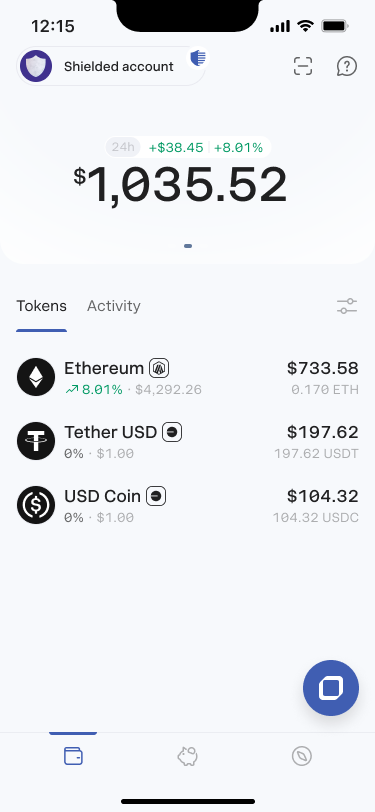
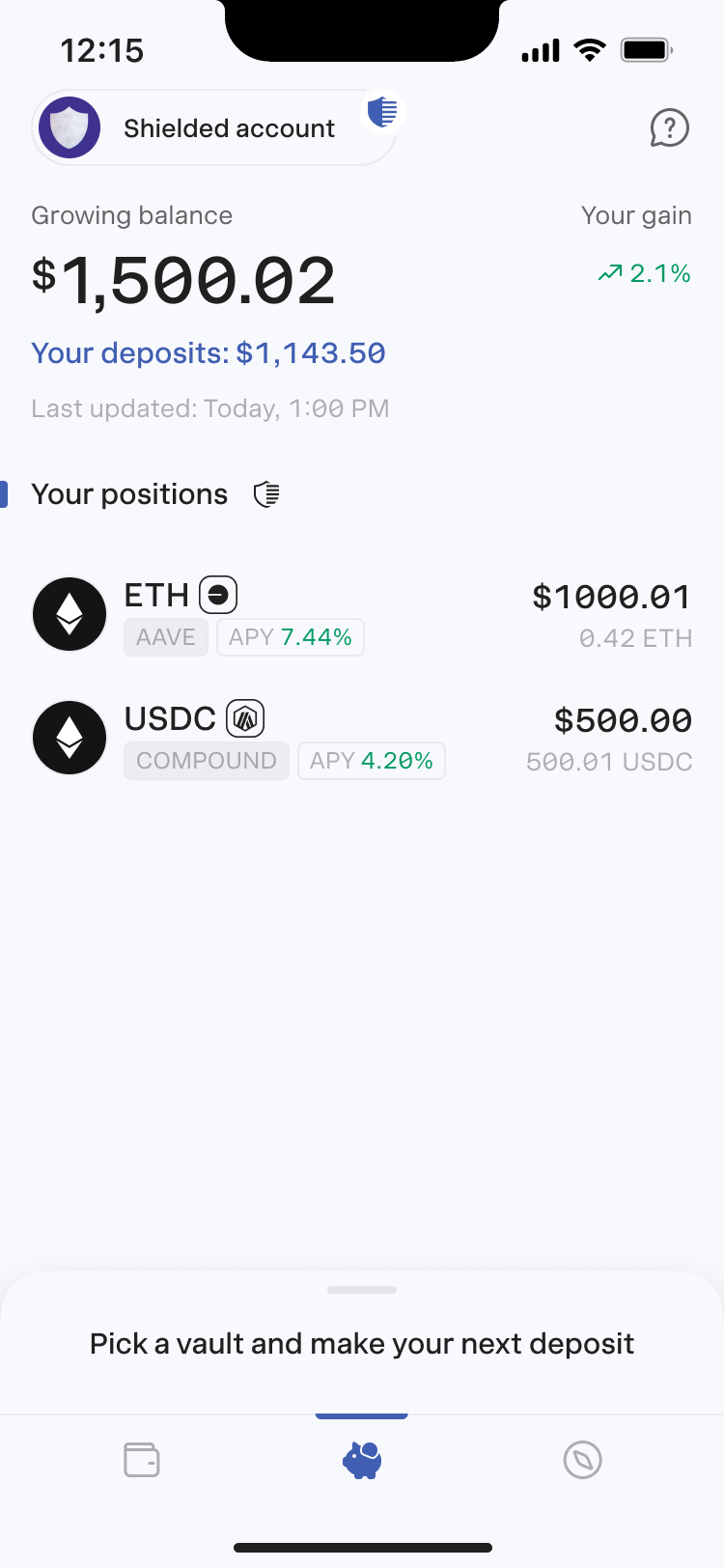
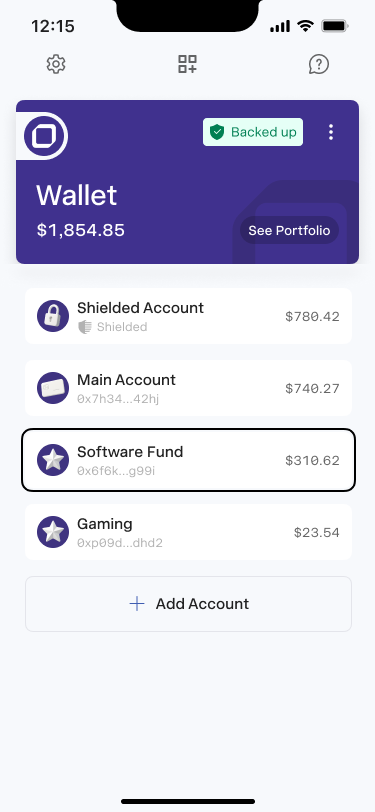
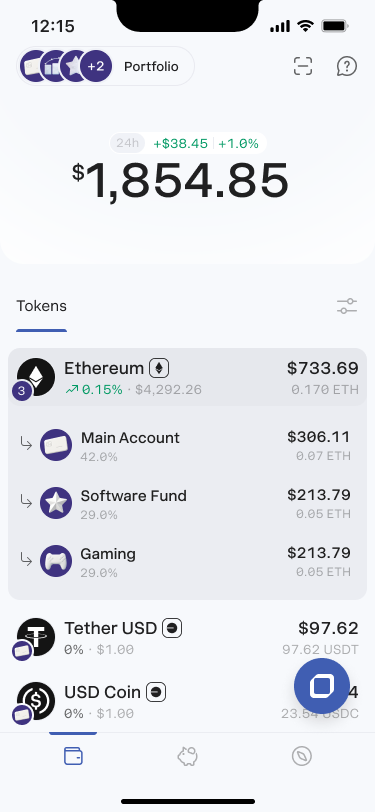
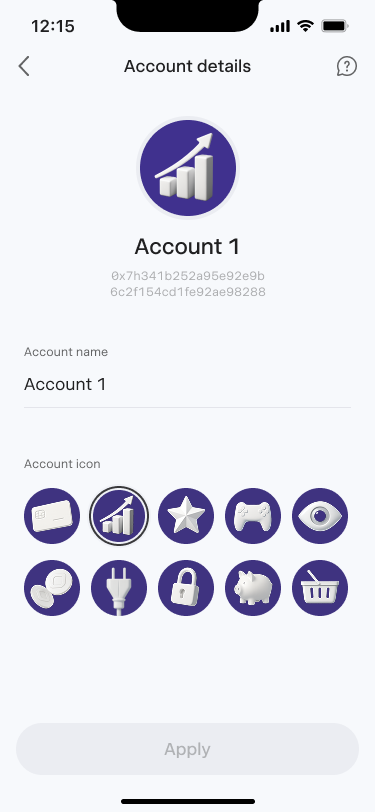
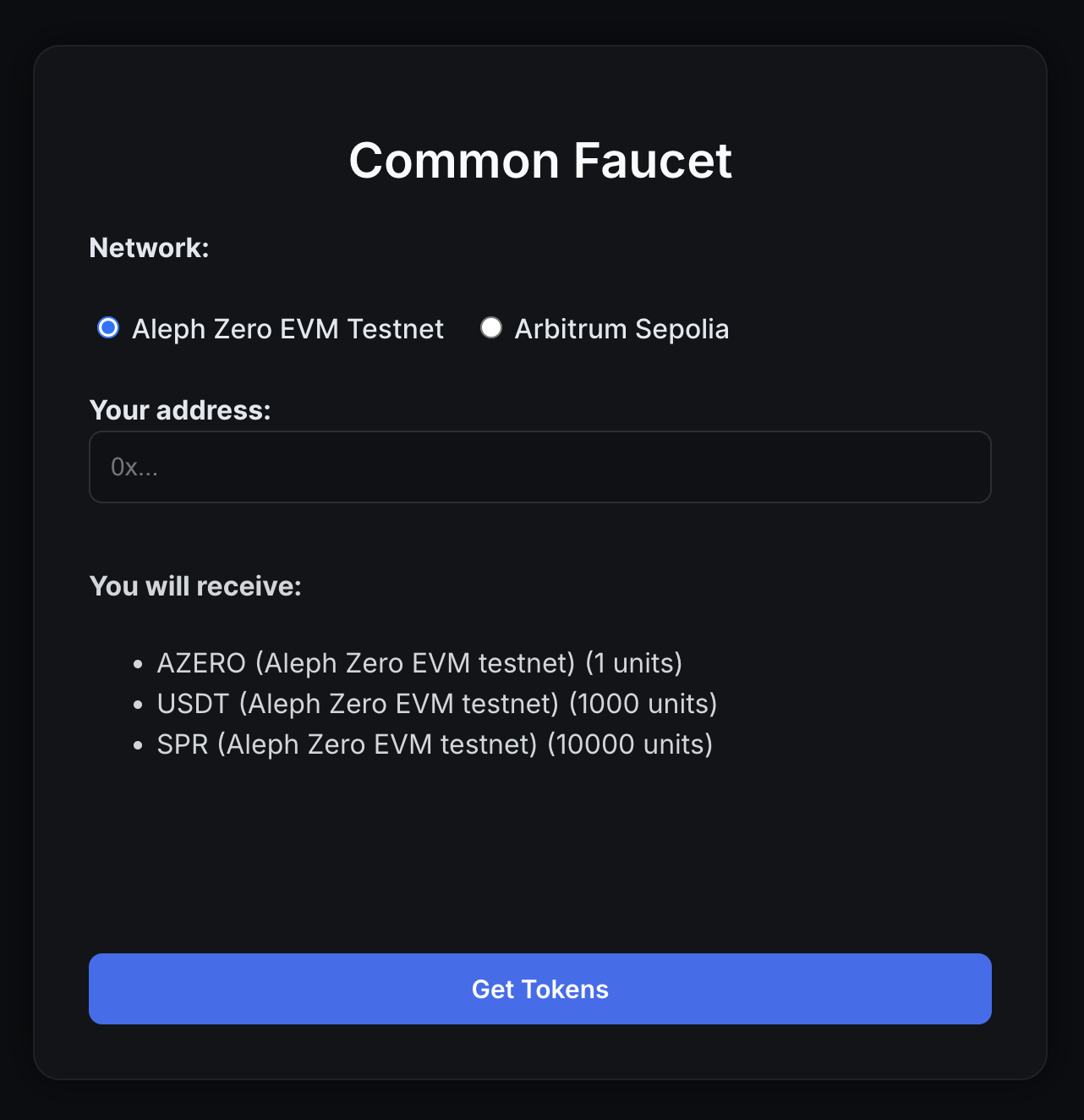
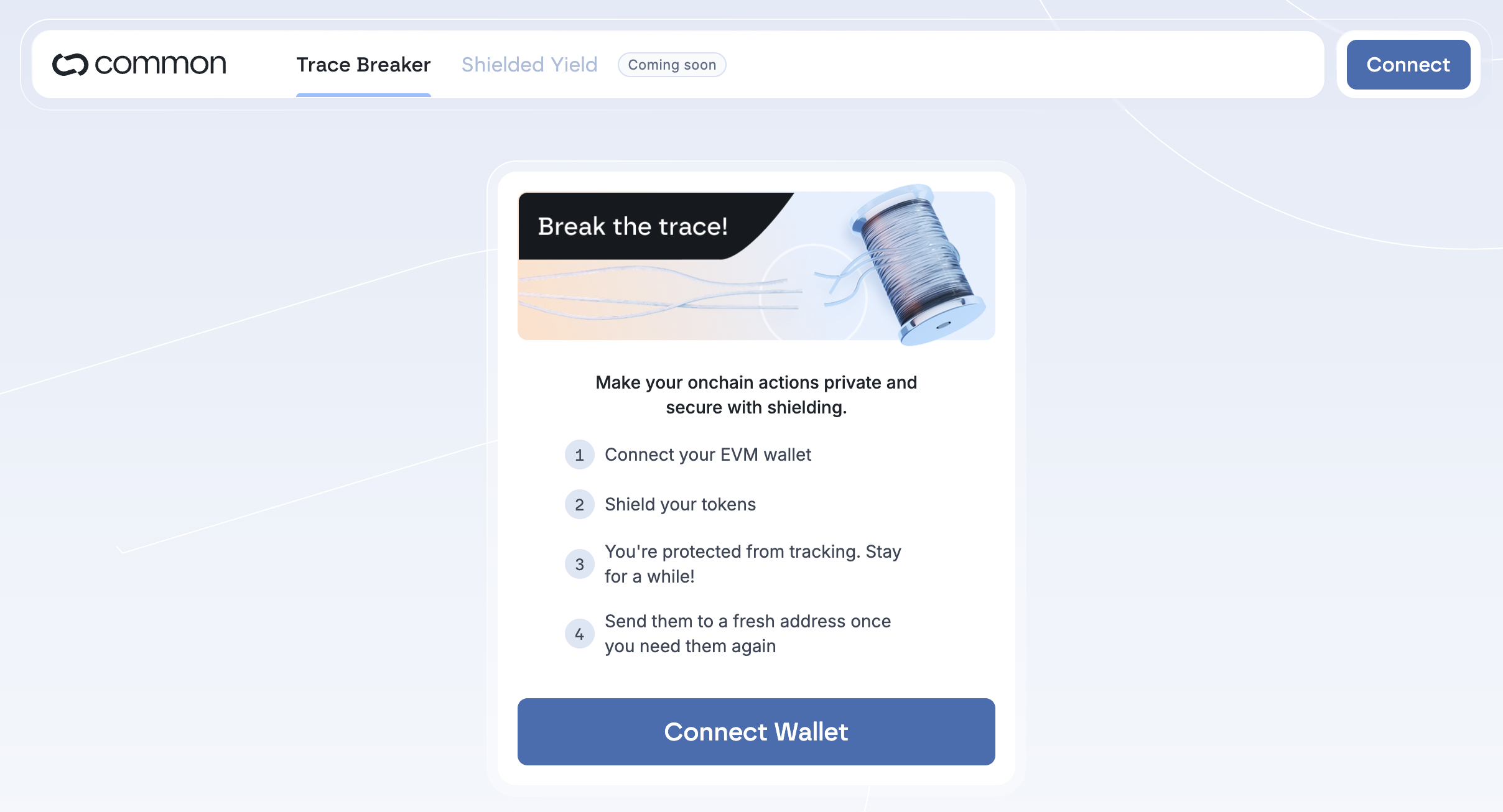
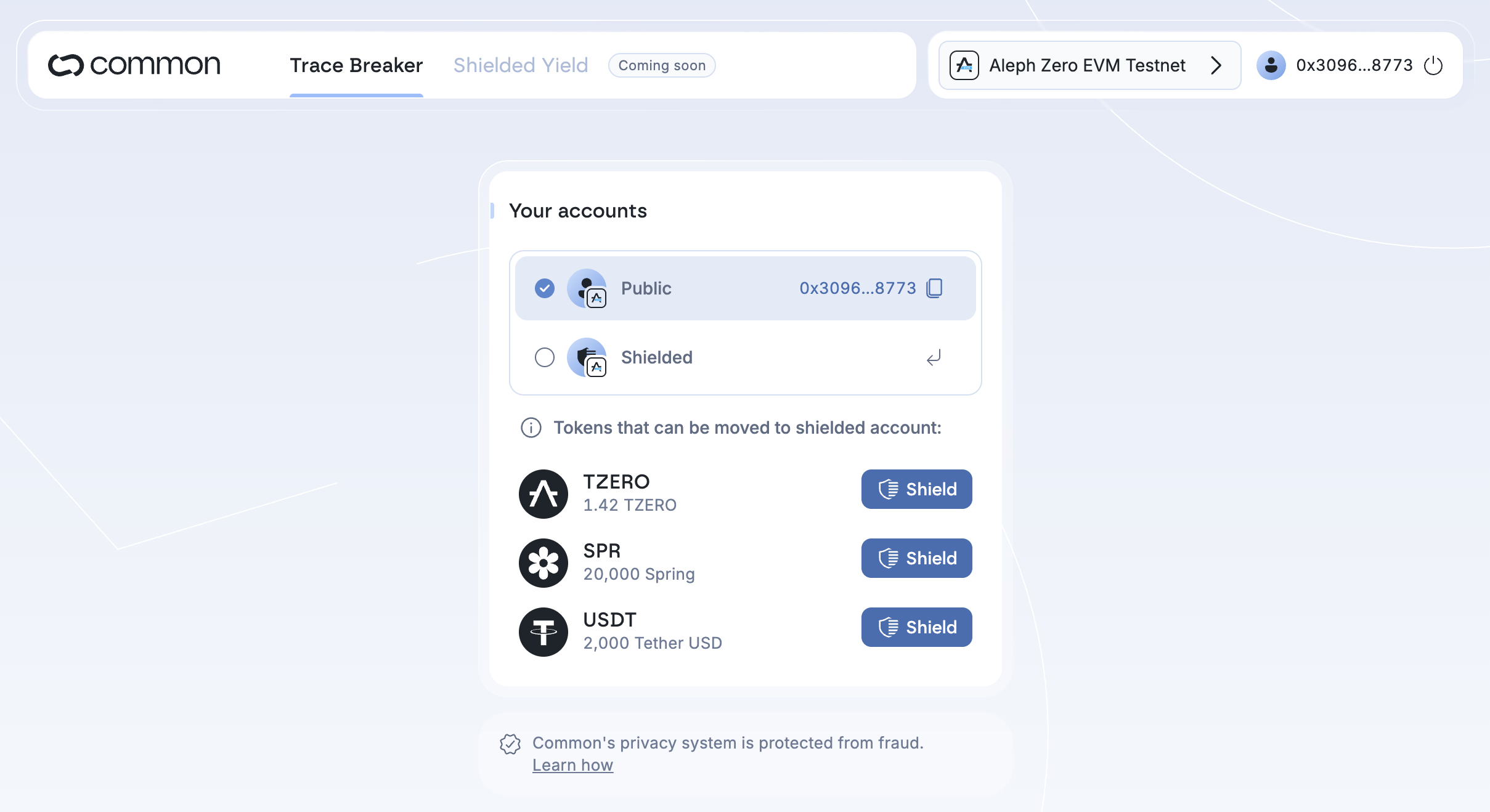
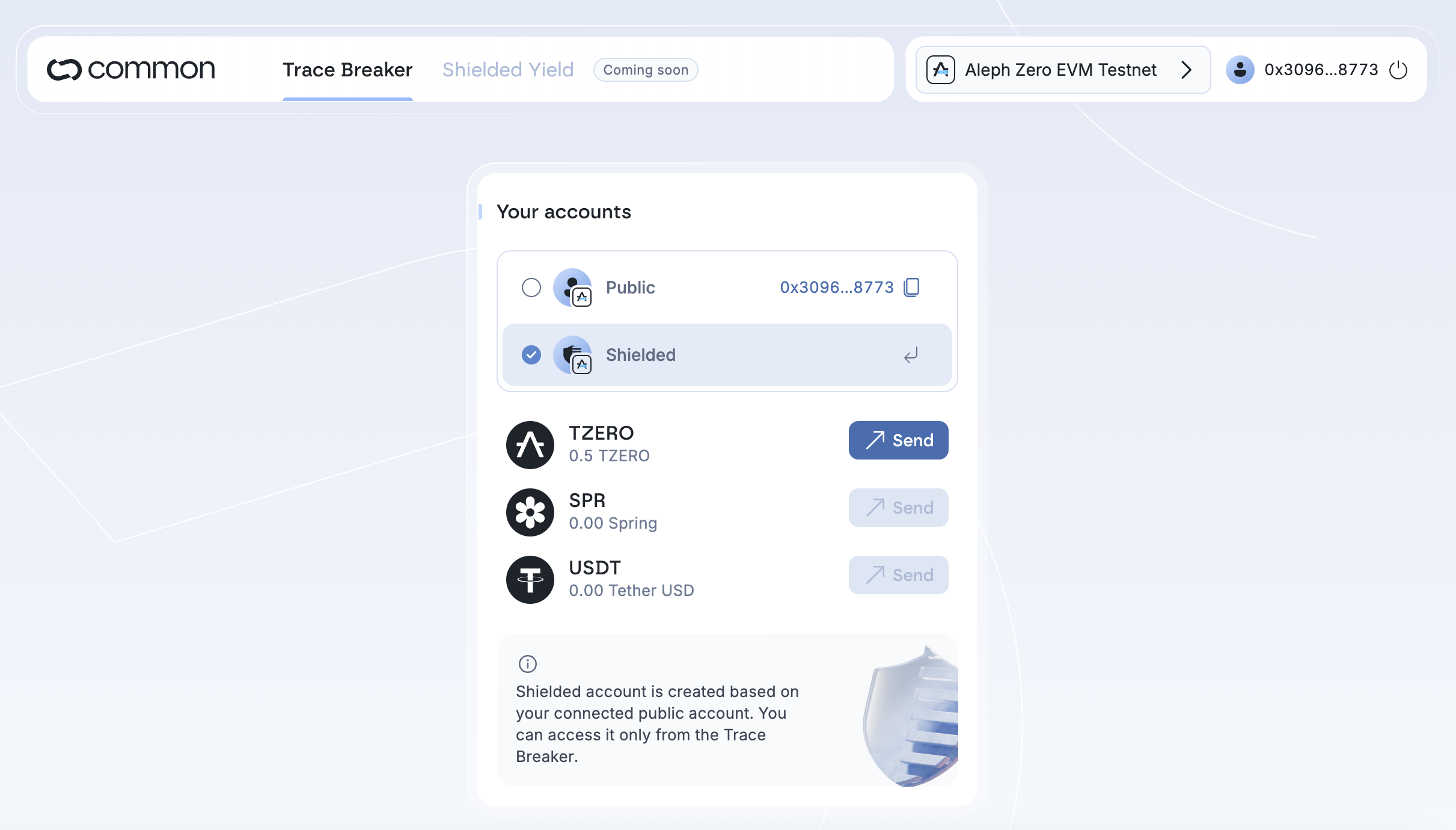


.png?alt=media&token=28afe8cf-f0ee-4544-9f21-76bc6fc85ac9)
.png?alt=media&token=fe900f63-2a09-464a-9a64-0d06fcb954c9)
.png?alt=media&token=4577162f-f286-4f3f-8e5e-da2173f29b96)